Mediabistro Logo Mediabistro Logo
  • Jobs
    Search Creative Jobs Hot Jobs Remote Media Jobs Create Job Alerts
    Job Categories
    Creative & Design Marketing & Communications Operations & Strategy Production Sales & Business Development Writing & Editing
    Quick Links
    Search All Jobs Remote Jobs Create Job Alerts
  • Career Resources
    Career Advice & Articles Media Industry News Media Career Interviews Creative Tools Resume Writing Services Interview Coaching Job Market Insights Member Profiles
  • Mediabistro Membership
    Membership Overview How to Pitch (Premium Tool) Editorial Calendars (Premium Access) Courses & Training Programs Membership FAQ
  • Showcase
    Featured Creative Stories Submit your Story
  • Log In
Post Jobs
Mediabistro Logo Mediabistro Logo
Search Creative Jobs Hot Jobs Remote Media Jobs Create Job Alerts
Job Categories
Creative & Design Marketing & Communications Operations & Strategy Production Sales & Business Development Writing & Editing
Quick Links
Search All Jobs Remote Jobs Create Job Alerts
Career Advice & Articles Media Industry News Media Career Interviews Creative Tools Resume Writing Services Interview Coaching Job Market Insights Member Profiles
Membership Overview How to Pitch (Premium Tool) Editorial Calendars (Premium Access) Courses & Training Programs Membership FAQ
Featured Creative Stories Submit your Story
Log In
Post Jobs
Log In | Sign Up

Follow Us!

Climb the Ladder

Essential Apps for College Students to Survive and Thrive

Apps for College students
Scouted.io icon
By Scouted
Scouted was a hiring marketplace that matched candidates to roles based on potential, serving clients from high-growth startups to Fortune 500 companies.
4 min read • Originally published November 29, 2017 / Updated April 2, 2026
Scouted.io icon
By Scouted
Scouted was a hiring marketplace that matched candidates to roles based on potential, serving clients from high-growth startups to Fortune 500 companies.
4 min read • Originally published November 29, 2017 / Updated April 2, 2026

They say that high school is the best time of your life, but why can’t college be instead? Yeah, finals week and getting internships are both pretty rough, but fret not! We’re here to help with six apps for college students that will help you survive (and hopefully thrive).


1. Google Drive

Price: (Pretty much) Free

What does it do?: Who doesn’t know what Google Drive is? For the small percentage that don’t, here’s an overview. In addition to all the other services Google offers for free, they also offer free cloud storage to anyone with a Gmail account (up to 15GB). After that, you’ll have to pay– but it’s pretty unlikely you’ll use up that storage anyway. Even if you do, it costs less than a tall vanilla frappuccino from Starbucks for 100GB of storage! It’s hard to complain about that. You can upload almost any file to Google Drive, and you can access it on pretty much any of your devices. If you’re not using Google Drive, you’re missing out.

Why is it useful to a college student?: It’s really common to collaborate on work in college and using Google Drive is an extremely easy way to do that. Plus, who doesn’t like to access their files on multiple platforms? The pricing isn’t too shabby either.

2. Evernote

Price: Freemium

What does it do?: It’s pretty self-explanatory, but you mainly use Evernote for everything notes-related. Evernote can do everything from save audio recordings, scan files, videos, and reminders to leaving annotations, drawings, and of course, written word notes on a file. It’s simple to use (yet flexible) and is accessible on basically any device.

Why is it useful to a college student?: Everyone takes notes differently and different note-taking methods might be pertinent to different classes and situations. Imagine you’re in music class. How would you plan to take notes for what a tune actually sounds like by typing down words? Audio recordings would be absolutely clutch for things like this. Are you an engineering student? Sounds like you’ll be drawing a lot of models– Evernote does that too. The best part about Evernote? You probably won’t max out your free storage until you graduate (AKA have a great paying job).

3. Mint

Price: Freemium

What does it do?: Mint is an app that helps you keep your financial life together. It manages your money and keeps track of how much money you’re spending, what you’re spending your money on, your overall bank balance, budgets, bill paying, and even credit scores. It’s basically the closest thing to a financial coach you can find in the app store.

Why is it useful to a college student?: It keeps you from being (more) broke. Being a college student generally means you’re really tight on money and ramen noodles basically become your best friend. Obviously, you don’t want to live that ramen lifestyle all the time. Everyone likes to spoil themselves sometimes. Mint helps you keep track of your finances so that your “sometimes” don’t become “all the times”.

4. Venmo

Price: Free (Until you owe your friend money)

What does it do?: Have you ever had a friend who promised to pay you back for covering their Chipotle, but never did? This app helps prevent that from happening ever again. With Venmo, you can make payments and receive payments to anybody who has the app. The best part of this app is that it takes exactly 0% commission on all transactions! The only payments you have to make with Venmo are to your friends when you forget to bring your wallet to lunch.

Why is it useful to a college student?: Let’s be real. Money is especially tight when you’re a student and not everybody is honest about paying people back. Venmo is an awesome way to avoid keeping “tabs” on your friends and receive payments in general.

5. Facebook

Price: Free

What does it do?: You know exactly what Facebook does.

Why is it useful to a college student?: This might sound pretty silly to add to the list, but Facebook is especially useful to college students. Facebook has evolved from a social network into a platform for exchanging contact information, finding and RSVPing for events, buying and selling used goods, and joining class groups. Want to meet more people in your major? There’s probably a Facebook group for that (if not, you can make one yourself in 5 minutes). Want to check out what’s going on tonight? There’s a feature for that. Even if Facebook isn’t “cool” anymore, most people in college use it, and it’s a great tool.

6. Alarmy

Price: Free

What does it do?: Alarmy wakes you up, whether you like it or not. Alarmy is built to intentionally make it difficult for you to turn off your morning alarm. You could set it up to turn off when you take a picture of your shower head, shake your phone a bunch of times, finish a math problem, etc. Talk about a wakeup call!

Why is it useful to a college student?: Nothing is worse than sleeping through your final exams (or any class for that matter). Avoid the headache and give Alarmy a try; it’s free!


Although these are very useful apps for college students, they’re also useful for almost anybody. Maybe after you graduate and get your first job out of college, you can upgrade to the premium plans and unlock their true potential. In the meantime, enjoy the student perks and freemium lifestyle.

They say that high school is the best time of your life, but why can’t college be instead? Yeah, finals week and getting internships are both pretty rough but fret not! We’re here to help with six apps for college students that will help you survive (and hopefully thrive.)

Topics:

Candidates, Climb the Ladder
Advice From the Pros

Does Your Right to Free Speech Extend to the Workplace?

Learn why the First Amendment doesn’t protect you from being fired

Does Your Right to Free Speech Extend to the Workplace?
Amirah icon
By Amirah Bey
Amirah Bey is a digital marketing strategist with over 10 years of experience across global brands including Amazon Web Services, Procore Technologies, and Mediabistro. A Howard University graduate and Army National Guard veteran, she specializes in lifecycle marketing, analytics-driven strategy, and digital experience optimization.
4 min read • Originally published August 15, 2017 / Updated April 2, 2026
Amirah icon
By Amirah Bey
Amirah Bey is a digital marketing strategist with over 10 years of experience across global brands including Amazon Web Services, Procore Technologies, and Mediabistro. A Howard University graduate and Army National Guard veteran, she specializes in lifecycle marketing, analytics-driven strategy, and digital experience optimization.
4 min read • Originally published August 15, 2017 / Updated April 2, 2026

Most employees think they know the basics of illegal or unjust termination. For example, being fired because you’re a person of color, a woman, a Muslim, or a Nazi is illegal, right? Wrong.

One of these things is not like the other, and, unfortunately, being a white supremacist could leave you jobless. But wait, this is America, I have Freedom of speech! Yes, you do, and you’ll still have it as you revamp your resume to look for a new job.

It’s time you learned your rights. Read on to find out just how speaking your mind could be a just cause for being let go.

Most of us know the First Amendment means we have the right to say pretty much whatever we want as long as it’s not obscene or does not incite harm. The First Amendment states, in relevant part, that: “Congress shall make no law…abridging freedom of speech.”

Supreme Court ruling Cohen v. California further asserted that “certain offensive words and phrases to convey political messages” are also protected.

Yet, many continue to mistakenly believe that their right to freedom of speech also extends to the workplace. Free speech only applies when the government is trying to infringe upon it.

Employers are governed by several laws in regards to termination. Thanks to Title VII of the Civil Rights Act, most employers are prohibited from terminating someone because of their race, gender, national origin, disability, religion, genetic information or age (if the employee is 40 or more years old).

The U.S. Equal Employment Opportunity Commission (EEOC) enforces Title VII, but it is important to note that not all employers are bound by the law, such as private organizations with 14 employees or less.

Other federal discrimination acts that govern termination include the Age Discrimination in Employment Act (ADEA), Americans With Disabilities Act (ADA), Equal Pay Act, Immigration Reform and Control Act (IRCA), Civil Rights Act of 1866 (Section 1981), Genetic Information Nondiscrimination Act (GINA).

None of these laws protects employees from termination for political or organizational affiliation, or for disseminating hate speech. Just as the government can not enforce limits on your speech, nor can it force an employer to retain someone.

Recently, a Google engineer disseminated an internal memo that caused an uproar from those who interpreted the letter as suggesting that women were inferior to men in engineering.

The engineer was fired from Google and although many have come to his defense, Google CEO Sundar Pichai defended the termination in a response memo. Pichai stated that “portions of the [the engineer’s] memo violate our Code of Conduct and cross the line by advancing harmful gender stereotypes in our workplace.”

But what about when you’re not at work? There are many examples of employers firing employees due to their actions or statements outside of the workplace.

Like in the case of a man fired from his hot dog job after participating in an alt-right, white supremacy march in Charlottesville, Virginia.

A Yale University Dean resigned this past June due to serious pressure from the Yale community after her offensive reviews on Yelp were brought to light.

An adjunct professor was fired from Essex County College in Newark, New Jersey, after appearing on Tucker Carlson’s show to defend a Black Lives Matter group’s decision to host a blacks-only Memorial Day celebration in New York City.

A former chief executive of Mozilla was forced to resign in 2014 after a public backlash against his stance opposing same-sex marriage.

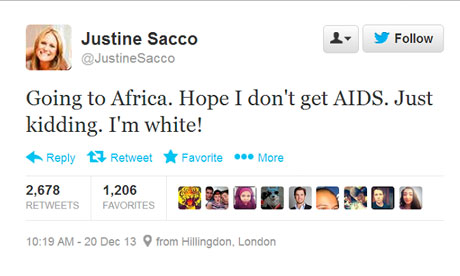
In 2013, a public relations representative was infamously fired after tweeting about contracting AIDs during her trip to Africa.

While a small number of states include statutes that prohibit employee termination due to employee actions deemed lawful acts, many companies have a code of conduct or include morality clauses in employee contracts that you may be violating should you move forward.

Before you decide to post what could be interpreted as a divisive message, or participate in what could be considered an alienating or hostile event or organization, you should thoroughly understand your company’s stance on this behavior.

Even if your company allows this kind of rhetoric outside of business hours, you should consider how it will affect your working relationships with colleagues and your future employment opportunities.

You don’t want to learn the hard way that free speech isn’t actually all that free.

Topics:

Advice From the Pros, Be Inspired
Productivity

Why Reorganizing Your Business Can Drive Digital Success

First step is clarifying business objectives

digital success shown through icon of arrow pointing upwards
By Sarah Hofstetter
4 min read • Originally published February 11, 2016 / Updated April 2, 2026
By Sarah Hofstetter
4 min read • Originally published February 11, 2016 / Updated April 2, 2026

Chief digital officer. Center of excellence. Digital by design.

Large companies with entrenched organizational dynamics are struggling to figure out how digital plays into their business models.

It’s been more than 20 years since the Internet entered our lives, but only recently have business leaders internalized the inherent importance of digital in driving communications, inspiring product development and influencing consumer and employee behavior in significant ways.

There has never been a more important time to reimagine how to achieve organizational success. Ongoing and rapid advancements in technology and consumer behavior are creating a gold mine of opportunity for the businesses that are putting digital at the center.

However, the path to success requires business leaders to do two things: recognize digital as a strategic driver of business success and change organizational patterns built around digital as a channel, to treat digital as a multidimensional ecosystem.

By loosening the grip on entrenched strategies and assumptions and opening up to different ways of thinking, any business can unlock new audiences and opportunities to grow.

We often see three barriers to digital success. First is that despite shifts to organizational integration, many companies are still held back by traditional ways of doing business—like outdated budgeting, ways of working and talent models—that are keeping them from taking advantage of new opportunities.

Secondly, data, analytics and performance-driven practices have become extremely sophisticated, with the ability to drive impact far beyond direct-marketing departments, but these practices are often disconnected from the C-suite and even brand-marketing teams.

And lastly, organizations continue to keep digital at the “edge,” putting responsibility either on junior employees or those at the core of a stand-alone group, sometimes called a “center of excellence.”

If any of these challenges sound familiar, it may be time to reorganize. To succeed will require business leaders to first clarify business objectives and aims and then recruit the right teams, champion a culture of curiosity and advocate for new ways of working both internally and with external partners.

Here are a few areas of focus to help business leaders evaluate what’s right for their organization:

Objectives

As with all business planning, the first step is to clarify the objective and North Star—identify where the organization wants to be and how to achieve that outcome.

For example, P&G Fabric Care wanted to build loyalty, move faster and improve processes without having to disrupt or overhaul the larger company, which is why it launched its “always on” environment.

This led to fantastic marketing from Tide and Downy. Recently, it evolved internal practices so the mindset around being digitally led and culturally relevant could be further ingrained into its communications planning, budgeting, activation and measurement.

Talent

Finding the right talent that can embrace change and digitally led approaches is essential (even if this really isn’t new).

This has nothing to do with age or experience level—it’s all about mindset. Facebook and Google do this by hiring for aptitudes, such as drive and the ability to think creatively, rather than just discrete skills.

This leads them to bring in talent who are hungry to make an impact, natural cultural fits and ultimately gives them the ability to identify better ways of doing business.

Advocates

Ensuring success requires multiple members of the C-suite to champion organizational change by inspiring others, demonstrating curiosity and openly showing they’re learning and adapting.

If an organization doesn’t have this leadership already, it should cultivate it. When leadership makes digital and integration a priority, so does everyone else.

For example, GE encourages development by having its management generate “Imagination Breakthroughs” during its twice-a-year meetings of senior executives. This spurs ideas for growth and creates a process to encourage talented people to participate.

Capabilities

Look at the strengths and weaknesses of the organization’s culture and capabilities, and re-evaluate which functions would be better incubated or fostered in-house vs. outsourced.

If a particular capability is core to its operations vs. core to its marketing, is it worth considering incubating it from within? The key to success is looking beyond the complexity of digital to drive better organization, strategy and change management.

At 360i, we are exposed to how many large companies are organized, and it’s clear that every business must find its own way toward organizing better for the digital age.

Specs

Claim to fame Kosher from birth with a Pez dispenser collection exceeding 800, Sarah Hofstetter, CEO of 360i, was on the Adweek 50 2013 list and recently named one of the most powerful moms by Working Mother magazine.
Base New York
Twitter @Pezmeister1

This story first appeared in Adweek magazine. 

Topics:

Be Inspired, Productivity
Job Search

This Week’s Best Job Search and Career Advice for Media Pros

Don't miss out on our most recent job search and career advice stories

Job search career advice
Katie icon
By Mediabistro
The Mediabistro editorial team draws on 25 years of media industry expertise to cover jobs, careers, and trends shaping the industry.
5 min read • Originally published July 29, 2016 / Updated April 2, 2026
Katie icon
By Mediabistro
The Mediabistro editorial team draws on 25 years of media industry expertise to cover jobs, careers, and trends shaping the industry.
5 min read • Originally published July 29, 2016 / Updated April 2, 2026

Got weekend plans? Whatever you do between now and Monday morning, be sure to carve out a few minutes for some reading that’ll do some good for your career.

We understand how busy you are at work, so we’ve rounded up the best career and job search advice from the past week so you can spend some downtime in the next few days fueling your job search. Whether you’re actively applying, thinking about making a move, or just keeping your skills sharp, there’s something below for where you are right now.

Can You Discuss Politics on Social Media When You’re Looking for a Job? Whether you hate both presidential candidates or love one of them, it’s hard to deny everyone is discussing politics online. But when you’re on the job market, every post is a potential first impression — and the wrong one can cost you before you even get to the interview. Here’s how you can join the conversation without jeopardizing your chances of landing your next gig.

What Does a Digital Marketing Manager Do? If you’re equally creative and analytical, and have digital chops to boot, this increasingly in-demand marketing role may be the one for you. The title shows up on a lot of job boards, but what’s the actual day-to-day? We went to real-life professionals to find out what it actually takes — the skills, the pace, and the parts of the job nobody mentions in the listing.

10 Ways to Use Body Language to Get the Job Actions do speak louder than words. You can nail every question and still lose points without even realizing it. Your posture, your eye contact, the way you shake someone’s hand — hiring managers notice all of it. Help yourself project the most positive mannerisms with these pointers on the body language to adopt in your next interview, and what to drop before you walk in the door.

Here’s Who Can Benefit From Hiring a Professional Resume Writer Not sure if it’s worth it to get a pro to help you with your CV? It’s not the right move for everyone — but for certain job seekers, it can make all the difference. If you’re changing industries, re-entering the workforce after a gap, or just not getting callbacks despite sending out plenty of applications, this is worth a read. Find out if you belong to one of the groups where a professional writer could give you that critical edge.

How to Turn a Marketing Coordinator Job Into a Stepping Stone If you’re just starting your career in media, you know it can be tough to get your foot in the door — let alone excel once you do. An entry-level title doesn’t have to feel like a dead end. Here’s how one marketing coordinator is not only doing the job well, but actively positioning herself for the next level. Practical, honest, and genuinely useful if you’re early in your career.

Why a Job Title Is the Single Most Important Element of Your Job Listing This one’s for the employers and the job seekers who want to understand the hiring side of the equation. Like the title of a book, a job title shapes how an outsider sees the role before they read a single word of the description. A vague or inflated title turns off the right candidates and attracts the wrong ones. Here’s how a well-conceived job title can increase applications — and improve the quality of who actually applies.

Nailed the Interview but Didn’t Get the Job? Here’s Why It stings, but it happens more than people admit: you walk out of an interview feeling great, and then silence. Sometimes a great interview just isn’t enough, and the reasons have nothing to do with your answers. There may have been an internal candidate all along. Budget may have shifted. The job may have been reconfigured. Knowing the real reasons helps you stop second-guessing yourself — and adjust your approach for next time.

Why You Need to Keep Your Resume Current — Even When You’re Not Looking for a Job You’re settled, you’re happy, you’re not going anywhere. So why bother updating your resume? Because opportunities don’t always announce themselves in advance. A recruiter might reach out. A colleague might forward your name. Or your situation might change faster than you expected. This piece makes the case for keeping your resume current at all times — plus some surprising reasons why the process itself is useful even if you never send it to anyone.

One Easy Tool That Can Improve Your Writing You’ve re-read your work, you’ve run the spellcheck, but there’s one more step most writers skip. A personal style sheet — a simple running list of your own style decisions and recurring vocabulary choices — keeps your writing consistent across projects and clients. It’s especially useful if you freelance or write for multiple outlets with different standards. Here’s how to build one and actually use it.

Do These Four Things Your First Two Months on the Job You landed the job. Now what? The first eight weeks are when impressions form, relationships get established, and you quietly signal whether you’re someone who can be trusted with bigger things. The instinct is to put your head down and focus on the work — but there are a few specific moves that set you up for success long after the honeymoon period is over. Here’s what to do before the new-hire shine wears off.

That’s the week in career advice. Bookmark what’s useful, share what resonates, and check back next week for another round. And if the reading inspires a job search, Mediabistro has thousands of media, marketing, and creative roles posted right now — start browsing while you have the momentum.

Topics:

Get Hired, Job Search
Job Search

ICYMI: This Week’s Best Career Advice and Job Search Reads

Get on your job-seach game with research tips, social media tactics and more

career advice and job search tips
Katie icon
By Katie Hottinger
@katiehottinger
Katie Hottinger is a content strategist and UX designer with over 15 years of editorial experience across brands including JPMorgan Chase, Google, Condé Nast Traveler, and Mediabistro. She specializes in digital content strategy and multi-platform editorial execution.
2 min read • Originally published April 22, 2016 / Updated April 2, 2026
Katie icon
By Katie Hottinger
@katiehottinger
Katie Hottinger is a content strategist and UX designer with over 15 years of editorial experience across brands including JPMorgan Chase, Google, Condé Nast Traveler, and Mediabistro. She specializes in digital content strategy and multi-platform editorial execution.
2 min read • Originally published April 22, 2016 / Updated April 2, 2026

Hooray, it’s Friday! Wrap up your workweek on a productive note by catching up on the latest Mediabistro career and job-search advice you may have missed. Then, get back to finishing your outstanding projects and drawing up that weekend to-do list. You’ve earned it!

Find the Best Employer for You With These Simple Tips: Learn how to research top companies in your field and target employers you’d like to work for with these easy steps.

How to Use Social Media to Find a Job: How do you get a hiring manager’s attention online? What are recruiting managers looking for in a candidate’s social-media profile? How important is your LinkedIn picture? Find out the answer to these and more in this recap of our first job-search Twitter chat.

How Do I Know I’m Taking the Right Job?: You’ve got the offer, but aren’t sure the job will be a good fit? Here are some pointers to tell if the prospective position will be the one for you.

Here’s Why You Didn’t Get the Job: You nailed the interview and had glowing references but still didn’t get the job? Here are some of the top reasons an offer may have eluded you, including what you may have done wrong.

What Does a UX/UI Designer Do?: If you have solid design chops and a passion for how digital products work and how users interact with them, a job in the growing field of UX/UI design may be for you.

6 Secrets to Surviving a Long Job Search: Good news: There’s a job out there for you. Bad news: It could take you weeks, or even months, to find it. Here are practical recommendations for making it through the long haul.

Kick Off Your Marketing Career in Any of These Fields: If you’re a work-force newbie with dreams of breaking into marketing, you probably already know you gotta start somewhere. Lucky for you, there are plenty of jobs in today’s top marketing fields—and on our job board.

12 Green Jobs to Check Out, Just in Time for Earth Day: Happy Earth Day! Here are an even dozen current openings on our job board that embrace the environment or sustainability issues.

Sick of Social Media? Here Are 5 Great Career Next Steps: Social media workers, take note: If you’re feeling a little worn out from constant content creation and interaction, and wondering what next step to take in your career, you’re going to “like” this post about alternative fields to pursue.

Topics:

Get Hired, Job Search
Advice From the Pros

Web Editor Success Tips: How to Land the Job and Build Your Career

Adweek's Aneya Fernando shares how she went from intern to web editor in three years, and what it takes to succeed in digital editorial today.

Aneya Fernando
Valerie icon
By Valerie Berrios
@valerieberrios
Valerie Berrios is a published author and senior content manager with nearly two decades of experience in digital publishing, including roles at Audible, Disney Streaming, Everyday Health, and Mediabistro. She specializes in content strategy, editorial operations, and international content launches.
6 min read • Originally published August 5, 2016 / Updated April 2, 2026
Valerie icon
By Valerie Berrios
@valerieberrios
Valerie Berrios is a published author and senior content manager with nearly two decades of experience in digital publishing, including roles at Audible, Disney Streaming, Everyday Health, and Mediabistro. She specializes in content strategy, editorial operations, and international content launches.
6 min read • Originally published August 5, 2016 / Updated April 2, 2026

Editor’s Note: This interview was originally published in 2016, when Aneya Fernando was a web editor at Adweek. She has since moved on from that role. We’re re-editing it as part of our archive of media interviews because the career advice still holds up.

Getting your foot in the door and climbing the ladder in media can be a challenge: The industry is always changing, career paths can be ambiguous, and social media never sleeps.

To help you find your way, we’re talking to media pros with a few years under their belts. Our Advice From the Pros series gives you real-world insights and advice you can apply to your job search, job interview, and—when you land that next gig—your new job, too.

Then, when you’re ready, check out our job board.

Aneya Fernando

Web Editor, Adweek

Aneya Fernando, who’s lived on both U.S. coasts as well as abroad in London, France and Chile, most recently landed in New York City, where she’s a web editor at Adweek. She’s worked at parent company Mediabistro Holdings (which recently spun off Prometheus Global Media) for almost three years.

Her current responsibilities include writing and editing content for Adweek.com; managing various editorial projects (including Adweek’s Graduate’s Guide); and overseeing the Adweek Blog Network.

Fernando graduated from the University of Nevada, in Las Vegas, with a degree in journalism and media studies, so an editorial gig was always in the cards.

So how’d she get her current job, and how’s she getting ready for the next stage of her career? Read on.

Twitter
LinkedIn
Instagram

What was your first job? And your first job in your chosen career?

My first job was as a hostess at an Italian restaurant. During that time I also wrote for the student newspaper at my university and later became an editor there. I scored my first internship at a local TV station, which I would say was my first real job in my chosen field. I got to edit, write and produce my own stand-ups [shots in which the reporter is standing at a scene, reporting the news], which really added to my portfolio.

How did you get this particular job?

After my local TV internship, I got an amazing opportunity to intern for CNN’s “Anderson Cooper 360.” That internship was truly the jump-start to my career. I made so many connections (including lifelong friends) during my six months there.

After the internship, I ended up doing social media for a small startup for a few months (for free) while applying for as many jobs as I could.

One day I came across a paid editorial internship position at Mediabistro, and applied right away on Mediabistro’s own site. I made sure to tailor my resume to showcase my writing and editing skills.

I got a call back for an in-person interview fairly quickly, and landed the gig. It turned out that Mediabistro owned two TV blogs, so in the end my AC360 experience was a real asset.

I was quickly promoted from intern to editorial assistant and then associate editor at the site. I think part of my rapid rise can be attributed to my actions as an intern. I always got my work done on time, I volunteered to help out on video shoots, was generally amiable and happy to help on any task that was asked of me, and I showed a real interest in writing.

Last year, Adweek bought Mediabistro’s blog network, and I was recruited to join Adweek’s Web team.

🚀 Key Takeaway: How Aneya Got Promoted Fast

  • Always got work done on time
  • Volunteered to help on video shoots
  • Stayed amiable and willing to help on any task
  • Showed genuine interest in writing

Is this where you always thought you’d end up?

I always thought I would be writing or editing in some capacity, whether it was novels or screenplays or for a magazine. My career did experience a couple of curveballs with my time in TV, but I’m so happy I had that experience, so I could discover what I didn’t want to do.

What made you want to pursue this role?

When my current boss recruited me to join Adweek, I was thrilled. Although I had loved my time at Mediabistro, the opportunity to work for a major trade magazine was kind of a no-brainer. I took it in a heartbeat.

What about your job gets you excited to jump out of bed every morning? What makes you want to hide under the sheets?

I love coming into the office, working with our amazing team of editors, writers and designers, brainstorming ideas, creating valuable content, and learning something new every day. Nothing really makes me want to hide under the sheets.

What’s your favorite thing about working at your company?

Definitely the people. We have the best Web team, and working with them makes the job a million times more enjoyable.

How do you stay on top of trends in your field?

I’m on Twitter all day, every day. It took some time for me to really get into it, but now it’s the first thing I look at in the morning. Also, as an editor for a media magazine, I read and edit countless articles a day, so that also helps me stay on top of trends.

The tools editors use are changing. AI editing tools are making some tasks faster, but attention to detail still separates a good editor from one who publishes mistakes. Software can catch typos, but it can’t tell you if a sentence works for your audience.

What leaders or companies in your field do you follow on Twitter?

As far as companies:

@nytimes
@FiveThirtyEight
@TheAtlantic

There are so many great writers on Twitter it’s hard to narrow it down. A few of my faves:

@emilynussbaum
@annfriedman
@Chelsea_Fagan

@emilynussbaum for TV reviews; @annfriedman for humor, plus she always showcases other women writers; and @Chelsea_Fagan because she’s hilarious and shares great financial advice.

What are you reading and watching right now?

Right now I’m reading Emily St. John Mandel‘s Station Eleven. As far as TV, my husband and I love “Last Week Tonight with John Oliver” and “Silicon Valley.” I’m also a huge fan of Samantha Bee‘s new show, “Full Frontal.”

What’s the biggest misconception people have about your role?

Probably that editing is boring. Which, yeah, it can be. But it can also be creative, and even fun!

What skills should a job seeker have when applying for a role like yours?

I know this is such a cliché, but attention to detail really is critical if you want to be an editor. Also you need to have great time-management skills, and be able to work well with a variety of people (with lots of different personalities!).

📋 Skills You Need to Be a Web Editor

  • Attention to detail — critical for any editor
  • Time management — juggling multiple deadlines
  • People skills — working with lots of different personalities

What advice would you give someone looking to break into this field?

Try to get as many internships as you can before you graduate. In the media industry, experience is the most vital asset you can have. Take an internship even if it’s not in your exact field. You never know when you might use those skills later on.

What tips do you have for those seeking mentorships?

I would say seek out people who seem friendly and willing to help. Offer to take a higher-up at the office out for coffee. Don’t be too pushy, and if they seem uninterested, back off. Be friendly, be authentic, and good luck!

Topics:

Advice From the Pros, Be Inspired
Be Inspired

Q&A with Sophie Jamison, Chief TikTok Officer at Made By Gather

How a 22-year-old went from selling shoes at the mall to running TikTok for major brands, and what content creators need to know about landing corporate roles.

sophie jamison
Jess icon
By Jess Focht
@jessfocht
Jess Focht is a writer and content strategist with 6+ years of experience in media, publishing, and brand storytelling. She has contributed to Insider, Grammarly, and The Creative Independent.
4 min read • Originally published March 14, 2023 / Updated April 1, 2026
Jess icon
By Jess Focht
@jessfocht
Jess Focht is a writer and content strategist with 6+ years of experience in media, publishing, and brand storytelling. She has contributed to Insider, Grammarly, and The Creative Independent.
4 min read • Originally published March 14, 2023 / Updated April 1, 2026

In this Q&A interview, Sophie “Lightning” Jamison shares how she went from creating content for fun to landing a Chief TikTok role, along with her tips for job-seeking content creators.

1. Tell us a little bit about your background. Where did you go to school and what did you study? What jobs have you had before your current Chief TikTok Officer role at Made by Gather?

I just graduated with a business degree in management from the University of Southern Maine. My sophomore year, I was selling shoes at Vans in the mall and discovered TikTok. I started my own channel centered around toy blasters and accumulated 1 million followers in six months. I then became the Chief TikTok Officer at Nerf for almost two years before moving to Made By Gather.

2. Nerf and Made by Gather are fairly different brands. What inspired the jump to Made by Gather? What skills were still able to transfer over?

These are two VERY different brands… I am all about challenging myself and finding growth from discomfort. I am also only 22 and want to continue to expand my skills and goals. Made By Gather was an easy pick based on their culture, goals, vibe, and values. Many skills are transferable as I am producing storytelling content that motivates a consumer to purchase a particular product, while understanding the ins and outs of TikTok. This includes editing, acting, writing, storytelling, understanding the target audience, marketing, and integrating fun.

3. Before these jobs, did you see yourself working in social media?

Not at all, I was set on being either a CEO or CMO.

4. How did you use TikTok specifically to create a company’s brand—and ultimately your own brand from that?

Originally, I used TikTok to create my Sophie.Lightning brand, which now has 2.1 million followers. Then, during my time with Nerf I was able to build this brand as a professional content creator working for a large company. With Made By Gather, I am starting from near scratch to create content that embodies the individual personalities for each Made By Gather brand.

Brands are hiring more content creators into full-time corporate roles because the line between personal influence and company voice has collapsed. If you can build an audience for yourself, companies want to know if you can do it for them.

5. What do you think it takes to be a content creator for a company today?

The answer to this question has many layers that include basic skills such as editing and recording to more fundamental learnings such as understanding marketing, target audiences, and brand image. There is a level of professionalism that is needed to fit in at a corporation but also a level of confidence and skill to fight for your ideas and content. I now speak at sales pitches, could explain the brand history and layers to anyone, and am creating content aligned with our long-term business strategy. You also must be passionate, have fun, and utilize serious perseverance.

6. What is your advice to job seekers trying to land a creative job by using their social platform(s)?

If you are a content creator, you are a hot commodity for any business. Lean into your strengths and find your niche to then find what companies may be a solid fit for you. This role as well as many other social media roles will only become more prevalent over the next few years, so be ready!

7. Do you have any other advice for job-seeking content creators or anything else to add?

I am so excited to be a part of this team and cannot wait for what the future holds. If you are a content creator right now, do not give up, be authentic, and remember that hard work pays off.

Sophie “Lightning” Jamison is a rising social media star and the Chief TikTok Officer at Made By Gather. She runs her own personal TikTok account with over 2 million followers and three MBG accounts, including Crux, Bella, and Beautiful by Drew Barrymore. Sophie is unapologetically herself and has created an internet presence by living her truth. Named to Adweek’s 2021 Women Trailblazers list, Sophie is striving to make her role more commonplace and institute positive change at corporations. In December, she graduated with a degree in Business Management and Entrepreneurship, then began her role at Made By Gather. She resides in Rhode Island, spending her free time surfing, hiking, and kayaking with friends and family.

Handles: TikTok @Sophie.lightning Instagram: @sophie.lightning


Interested in a creative gig? We have some open jobs for you!

Topics:

Advice From the Pros, Be Inspired
Careers & Education

Sales email subject lines that actually convert

By Xier Dang for Apollo
11 min read • Published April 1, 2026
By Xier Dang for Apollo
11 min read • Published April 1, 2026

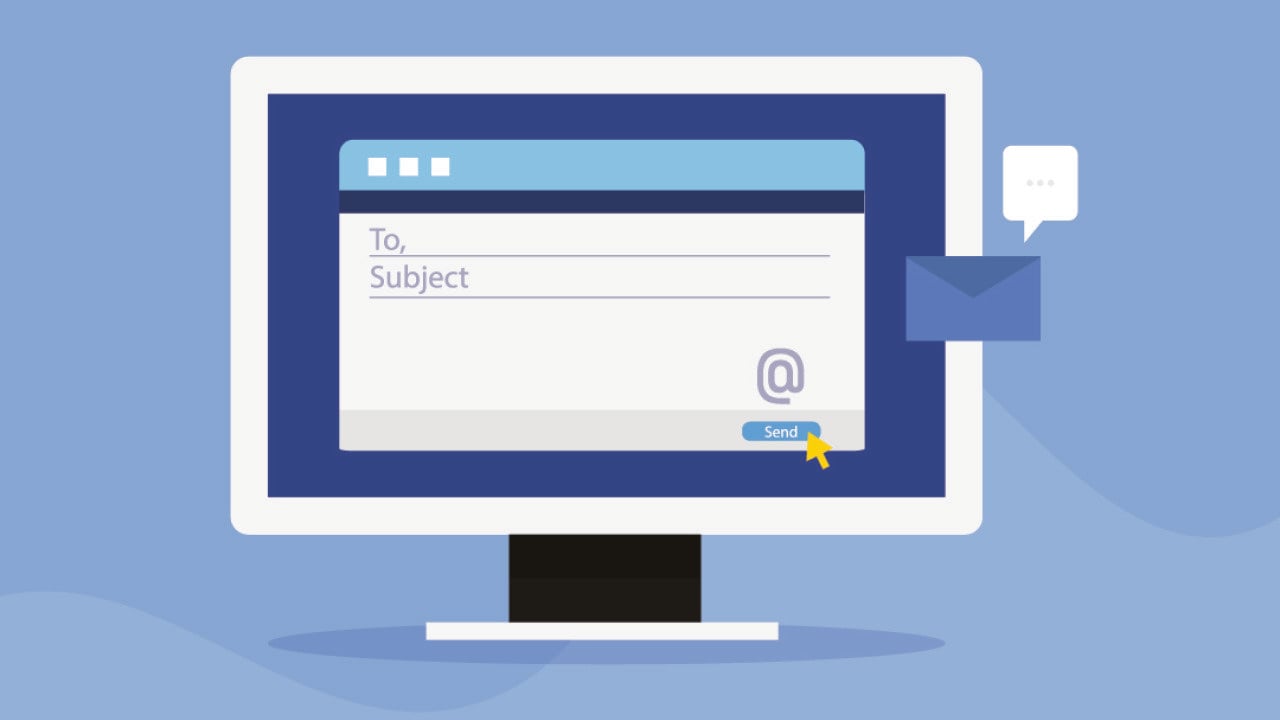
Vector illustration of an email and subject line on a desktop.

Sammby // Shutterstock

Sales email subject lines that actually convert

You’ve spent dozens of hours writing, tweaking, and perfecting the body of your outbound prospecting emails, trying to find the perfect message that will generate meetings and drive revenue.

But all of that stellar sales copy will go unread without a click-worthy email subject. A whopping 64% of email recipients decide to open emails based on subject lines alone.

These 40-character tidbits are the MVPs of email marketing — the salespeople and marketers with the highest open rates craft email subject lines that their subscribers simply can’t resist.

Looking to join them?

Below, Apollo lets you in on what makes the best email subject lines and provides you with dozens of first-rate examples that you can use to instantly boost open and response rates.

Why are email subject lines so important?

Your prospects’ inboxes are flooded with hundreds, potentially thousands, of emails every single day. According to a study by MailerLite, the average click-to-open rate is 6.8%.

This is why catchy, clear email subjects are more important now than ever.

Based on your subject line, they decide right then and there if your email is worth their precious time.

Spending a little extra time on your email subject lines will help you get more customers to open your emails, avoid emails going to the spam folder, get your message in front of the right people, and support you in establishing a high-quality brand.

Email subject line best practices

Understand your target audience

To craft a great subject line, you need to understand two things: who your audience is and what motivates them.

Know exactly what buyer personas you are reaching out to and consider your company’s unique value proposition. To improve your email open rate, find opportunities to communicate that directly in the subject line.

Add personalization

Collecting data with the knowledge, permission, and explicit consent of your prospects and customers will put you ahead of the competition by opening endless personalization opportunities.

You can personalize according to new roles taken, company funding rounds, recent searches, post-purchase follow-ups, and more.

Be descriptive

Sometimes, it’s better to be direct and descriptive rather than trendy.

Popular snippets like “don’t open this email” or “per my last email” don’t offer a specific hook. Instead, try to communicate the benefits of your product or call attention to specific offers.

Keep it short

Shorter is often better, especially considering how many people read emails on mobile devices.

Try to keep your title limited to no more than nine words and 60 characters.

Highlight videos or attachments

Simply including the word “video” in your email subject can increase open rates by as much as double, according to a case study conducted by Sendspark.

Adding a video, linking to a presentation or podcast, or including a helpful guide are all great ways to make your email content varied and more engaging.

If any of these are in the body of your email, make sure you are letting the reader know in the subject line so they don’t miss out!

Get inspired with the S.P.E.C.I.A.L. formula

A helpful framework for nailing your email subject lines and getting the creative writing juices flowing is the S.P.E.C.I.A.L formula:

  • Similarities: Find “uncommon” similarities between you and the receiver. What is something you two can uniquely relate to? (e.g., hockey fans, cities traveled to, pets, unique hobbies).
  • Personalization: As covered above, just a tiny bit of personalization can help you stand out from the crowd.
  • Expiring: Add a sense of urgency or time limit. Subject lines that include dates or a sense of urgency tend to perform better than those that do not.
  • Curiosity: Engage the receiver just enough so they want to open your email. The best curiosity email subject lines leave out just enough info to create a sense of intrigue.
  • Invigorating: Utilize capitalization, exclamation points, or emojis to add excitement and other positive emotions.
  • Avoidance: Avoid the common pitfalls most emails suffer from (e.g., typos, spam words, too many emojis).
  • Length: Choose the right length. When in doubt, keep it short.

What to avoid in sales email subject lines

A great subject line gets you in the door. A bad one gets you sent straight to the spam folder. While you’re getting creative, make sure you steer clear of a few common traps that can hurt your deliverability and credibility.

Avoid spam trigger words

Email services are smart, and they’re looking for words that sound too good to be true. Using words like “free,” “guarantee,” “no obligation,” or “winner” can get your email flagged before your prospect ever sees it. The same goes for using ALL CAPS or too many exclamation points!!! It feels like you’re yelling, and nobody likes that.

Don’t be misleading

Using “Re:” or “Fwd:” to fake a previous conversation is a quick way to lose trust. Your subject line should be an honest preview of what’s inside the email. Clickbait might get you a few opens, but it won’t get you any meetings if the reader feels tricked.

Steer clear of generic phrases

Phrases like “Checking in” or “Quick question” are overused and don’t offer any value. Your prospect has no reason to open them over the other hundred emails in their inbox. Always aim to be specific and relevant to them.

Email subjects that get clicks (and why)

Groupon: “The Deals That Make Us Proud (Unlike our Nephew, Steve)”

Marketers will seldom opt for humor when crafting their email subject lines. But Groupon took a risk here, and it paid off.

If you can get a chuckle out of readers, you can be sure you’re generating interest.

Takeaway: Appropriate humor and taking risks can help you stand out.

Booking.com: “New Year, New Travel deals – {Name}, where do you want to go?”

Who doesn’t like to travel?

Personalization goes a long way. This email may or may not contain all those places that prospects have on their travel list, but it is intriguing enough to open and see what deals they have.

Emails like this insist on urgency, and you just cannot ignore them!

Takeaway: Use open-ended questions, personalization, and urgency to prompt recipients to act.

Quicksprout: “18 Tools for Better Content Creation: Improve Your Writing with Less Effort”

A study conducted by Alchemy Worx analyzed data from 21 billion marketing emails and found that including the word “content” in subject lines can increase open rates by 59%. (With other high-performing words including: “upgrade,” “just,” “go,” and “wonderful”).

This effective subject line also promises to give the reader tangible tips and tools for improving their output if they open it.

Takeaway: Word choice can make a huge difference!

Pizza Hut: “Feed your guests without breaking the bank”

This subject line promises to help readers host their friends for dinner on a reasonable budget.

It addresses a specific pain point that explains to recipients how Pizza Hut’s product or service provides a value that meets their needs.

Takeaway: Get to know your audience and their needs and find opportunities to address them in your subject lines.

“[X] recommended you!”

“X” can be a mutual connection, a close friend, or even just a workplace acquaintance.

Either way, this subject line works because it instills a sense of curiosity and intimacy in recipients. People love to feel known, and this is an email subject that is sure to generate clicks.

Takeaway: Instill a sense of curiosity in your subject lines to compel readers.

50+ sales email subject line examples by category

To help you get a jumpstart on your email campaigns, here are even more examples of great email subject lines for several occasions:

(Note: When reading through all these examples, keep in mind that what works for one brand may not work for yours. It all depends on your brand personality and voice, how you communicate with your audience, and how they view you as sellers!)

Welcome email subject lines

To welcome new subscribers to your email list, give them a friendly introduction to your business. Try thinking of welcome email subject lines as a quick follow-up to thank the new subscriber for joining your list. Your subject line can help with this by picking up where you left off at the signup form or confirmation email.

To start, here are some ideas for welcome email subject lines:

  • Welcome to the crew!
  • Today, you made a great decision
  • Happy to have you in the fam!
  • Everything you need to know about [your business]
  • Are you new here? We are here to help
  • You’re in! Let’s begin
  • A Welcome Offer: 15% off!
  • 4 Ways to Get Started with [business]

Keep in mind: Email automation makes sending out welcome emails a piece of cake.

Fear of missing out (FOMO) subject lines

Playing to your audience’s fear of missing out (or FOMO) is a powerful subject line tactic. Here are some examples:

  • By Invitation Only: Exclusive Rewards Inside!
  • Don’t let this $10 bonus slip away!
  • Grab a {product name} before they’re gone!
  • Click it or miss it, people: [X] is ending
  • You’re missing out on points
  • 73% OFF gone in 3…2…1…
  • Hey, did you forget to open this?
  • Uh-oh, your trial is expiring
  • $55 today, $997 tomorrow
  • [URGENT] You’ve got ONE DAY to watch this…

The goal here isn’t to make anyone feel bad, but instead to prod them to open up your email with the promise of exclusivity and limited-time offers.

Pain-point subject lines

Focusing on your prospect’s pain points can make your subject lines hyperrelevant. Nobody wants to turn down the opportunity to discover a solution to a business problem.

Here are some catchy email subject lines that address pain points:

  • Stop wasting time on mindless work…
  • Struggling with a business decision? I made you a 1-page framework to help!
  • Engaging your prospects can be hard. Video makes it easy.
  • Get up to 20% better email deliverability (and a handy checklist!)
  • Hi, {Name}. Here’s what we think about {pain point}
  • 10 workarounds for your {pain point}
  • Sales are slipping through your fingers
  • Everything you wanted to know about email copy but were too afraid to ask

Question subject lines

Using a question in your subject line tempts readers with curiosity. They work well because subscribers want to know the answer to a question, be it in the email or on your website.

  • Are you a part of the {X}%?
  • {Name}, is it your lucky day?
  • Are you still thinking it over?
  • Do you check your emails when you first wake up in the morning?
  • Can you believe it’s been a month?!
  • Is this the hottest career in marketing?
  • [POLL] Can you answer this?
  • Are you making this landing page mistake?

Personalized subject lines

All of your email subject lines should be personalized to some degree.

But in the instances that you want to give your prospect a small shove with some hyperpersonalization, here are some ideas for your next subject line:

  • You’re eligible, {Name}: We’re giving you an opportunity to earn a $100 referral bonus
  • Congratulations on Series B funding!
  • {Name}, thanks for being a loyal member
  • Happy {brand/company} Anniversary, {Name}!
  • {Name}, check out these handpicked offers!
  • {Name}, for you to enjoy at your leisure
  • I heard you spoke at a conference last week!

Connection and referral subject lines

People respond when they see a familiar name. Whether it’s a mutual connection, a colleague, or someone from their network, these subject lines leverage social proof to get attention:

  • {Mutual connection} suggested I reach out
  • Your colleague {Name} thought we should connect
  • Following up on {Referrer’s} introduction
  • {Name} said you’re the person to talk to about {topic}
  • Recommended by {Company} team
  • {Connection} mentioned your work with {project/initiative}
  • Connecting through {mutual group/event}

Industry-specific subject lines

Speaking your prospect’s language shows you understand their world. These subject lines tap into industry-specific challenges and opportunities:

  • [SaaS] Reduce churn by X% with this approach
  • [Healthcare] HIPAA-compliant solution for {challenge}
  • [Finance] Cut compliance costs without cutting corners
  • [Retail] Turn inventory data into revenue
  • [Manufacturing] Minimize downtime, maximize output
  • [Real Estate] More qualified leads, less cold calling
  • [Education] Streamline admissions without the headaches

Follow-up subject lines

The fortune is in the follow-up, but you need fresh angles to re-engage prospects who’ve gone quiet:

  • Did this get buried in your inbox?
  • Wrong timing? Let me know
  • Still interested in {specific benefit}?
  • Quick update on {their company/initiative}
  • Different approach to {their challenge}
  • Should I close your file?
  • One more thing about {previous topic}
  • Bad timing or bad fit?

Start converting more prospects with better subject lines

Writing a subject line that converts isn’t about finding one magic phrase. It’s about understanding your audience, communicating value, and sparking just enough curiosity to earn a click. The best sellers know that a few extra minutes spent on a subject line can be the difference between a deleted email and a booked meeting.

Now that you have the strategies and examples, it’s time to put them to work. The key is to test what resonates with your audience and optimize your approach based on real data.

Frequently asked questions about sales email subject lines

What should be the subject line for a sales email?

A great sales email subject line should be personalized, relevant, and concise. It needs to grab attention by either sparking curiosity, addressing a specific pain point, or offering clear value. There’s no single perfect subject line, but the best ones make the recipient feel like the email was written specifically for them.

What email subject lines get the most opens?

Subject lines that are personalized with a name or company, ask a relevant question, or create a sense of urgency or exclusivity tend to get the most opens. Referencing a mutual connection or a recent company event also performs extremely well. Ultimately, the highest-performing subject lines are the ones that are most relevant to the recipient’s immediate challenges or goals.

How do you write a killer email subject line?

To write a killer subject line, start by researching your prospect. What are their pain points? What’s new with their company? Use that insight to craft a message that’s hyperrelevant. Keep it under nine words, use numbers or questions to stand out, and always provide a clear reason for them to open the email. The goal is to be intriguing, not vague.

What words should I avoid in sales email subject lines?

You should avoid common spam trigger words like “free,” “sale,” “guarantee,” “winner,” and “act now.” Also, steer clear of using all caps, excessive punctuation, and misleading prefixes like “Re:” or “Fwd:”. These can hurt your email deliverability and damage your credibility with prospects.

How do I know if my subject lines are working?

The best way to know if your subject lines are working is to track your open rates. Use A/B testing to compare different subject lines with the same email body. This allows you to see which style, tone, or topic resonates most with your audience.

This story was produced by Apollo and reviewed and distributed by Stacker.

Topics:

Careers & Education
media-news

TrustNFT Publishes Research on Email Fraud's Devastating Impact on American Seniors, Revealing $3.4 Billion in Annual Losses Among Americans Over 60

By Media News
3 min read • Published April 1, 2026
By Media News
3 min read • Published April 1, 2026

New white paper documents how criminals exploit trusted brands – utilities, Medicare, banks – to defraud the nation’s most vulnerable email users, and what families can do right now to stop it

MIAMI, FL / ACCESS Newswire / April 1, 2026 / TrustNFT.io today released "America’s Most Targeted Inbox: How Email Phishing Scams Target Seniors, Destroy Financial Security, and What Families Can Do to Stop It," a white paper examining the disproportionate impact of email phishing fraud on older Americans and the practical protective measures available to individuals and families.

The white paper, available free at research.trustnft.io, arrives as elder financial fraud reaches historic levels. The FBI’s Internet Crime Complaint Center reported that Americans over 60 lost $3.4 billion to fraud in 2023 – the highest of any age group – with email-delivered scams serving as the primary delivery mechanism. The average loss per elder fraud victim was $35,101, representing many seniors with the loss of life savings accumulated over decades of work.

White Paper Highlights:

One in three Americans over 65 receives a phishing email every week – emails crafted to be indistinguishable from real communications from utilities, Medicare, the IRS, and major banks

78% of senior phishing victims never report the crime – shame, embarrassment, and fear of losing independence prevent victims from seeking help or justice

Elder fraud losses grew 183% between 2019 and 2023, far outpacing fraud growth in other demographic groups

The six psychological factors that make seniors disproportionately targeted – including accumulated wealth, trust in authority, and under-reporting from shame

Detailed analysis of the four most dangerous scam categories: utility billing fraud, Medicare impersonation, IRS phishing, and bank fraud

The family dimension: 62% of adult children helped a parent deal with a fraud attempt in the past 12 months, spending an average of 11 hours per incident

Practical protective steps for individuals, families, and policymakers – including the Guardian consumer protection approach

"The data tells a heartbreaking story about who is being harmed. Seniors who spent their lives building savings are losing them in minutes – to criminals sending convincing fake emails from their electric company or their Medicare plan. The technology to stop this exists. The question is whether we deploy it fast enough."

– Stuart Fine, CEO, TrustNFT / Remergify

The white paper introduces TrustNFT Guardian– a browser extension that automatically monitors emails from companies that seniors trust most and displays a visible badge indicating whether each email is genuine or suspicious. Adult children can configure Guardian for an elderly parent in approximately five minutes, with the senior requiring no technical knowledge or change in how they use email.

About TrustNFT Guardian

TrustNFT Guardian will available at no cost at guardian.trustnft.io. in the next few weeks. The Guardian Pro plan, providing family protection for up to five family members, will be available at $7.99 per month. The extension supports Gmail, Microsoft Outlook, Yahoo Mail, and AOL Mail.

About TrustNFT

TrustNFT is a blockchain-anchored anti-fraud and anti-counterfeiting verification platform developed by Remergify, LLC, headquartered in Miami, Florida. TrustNFT operates two complementary products: TrustNFT Verify, an enterprise email domain verification service for corporations, utilities, financial institutions, and government agencies; and TrustNFT Guardian, a consumer email protection product that helps individuals and families identify phishing emails before clicking on them. TrustNFT Verify uses blockchain technology to create an immutable, unforgeable record of verified corporate sending domains, displayed as a visible trust badge inside consumers’ email clients in Gmail, Outlook, Yahoo Mail, and AOL Mail.

Media Contact

Stuart Fine, Chief Executive Officer
TrustNFT / Remergify, Miami, Florida
Email: stuart@trustnft.io
Web: research.trustnft.io

SOURCE: Remergify, Inc.

View the original press release on ACCESS Newswire

Topics:

media-news
media-news

Chef Cara Di Falco Highlights Easter Recipes, Brunch Ideas and Hosting Ideas for 2026 on TipsOnTv

By Media News
3 min read • Published April 1, 2026
By Media News
3 min read • Published April 1, 2026

Elevated Nostalgia Meets Contemporary Flavor as Chef Cara Di Falco Re-imagines Classic Easter Favorites

ATLANTA, GA / ACCESS Newswire / April 1, 2026 / As spring begins and Easter approaches, Emmy-nominated chef, culinary journalist and Italian food expert Cara Di Falco shares insights on emerging hosting trends for 2026, highlighting how "soft hosting" and "elevated nostalgia" are shaping seasonal celebrations. The trend focuses on affordable seasonal details, simplified menus and thoughtful presentation, offering a fresh approach to entertaining that blends tradition with modern convenience. Di Falco explains how classic Easter favorites are being refreshed with updated flavors and contemporary presentation while remaining approachable for home cooks.

She also highlights décor and entertaining trends defining the season, including easy DIY centerpieces, ready-to-serve brunch staples, premium seasonal sweets and bright, family-friendly activities that help create a festive spring and Easter celebration.

EASILY ADD PERSONALIZED TOUCHES

It is the little details that elevate spring or Easter gatherings, and a full craft room is not needed. Celebrate Spring with Cricut. Using Cricut Joy Xtra and the new Guided Flows in Cricut Design Space, make everything from customized Easter baskets to spring-themed decor. This compact smart cutting machine makes it easy to bring bright, creative ideas to life. It cuts 50-plus materials, and with Cricut Design Space, it’s easy to customize projects, whether a beginner or an experienced crafter. For more information, visit cricut.com

EASY MENU IDEAS

For easy entertaining, lean on Bob Evans. Their ready-to-heat side dishes, including Family Size Macaroni & Cheese and Original Mashed Potatoes provide homestyle comfort, making connection the centerpiece of Easter celebrations. They are microwave ready in minutes, which is a helpful option when hosting. They are also made with real ingredients like 100% real cheese, potatoes, milk and butter. Serve them as-is or use them in recipes, like Macaroni & Cheese Breakfast Casserole, which is well suited for Easter hosting. For more information, visit www.bobevansgrocery.com

SOME SWEET TRADITIONS

Celebrate Easter with something sweet. Unwrap the magic of Easter with Lindt’s iconic GOLD BUNNY, available in rich Milk Chocolate and a new Salted Caramel. They also serve as decorative centerpieces for Easter baskets or spring tables. This year, Lindt introduces new additions to the Easter lineup, including GOLD BUNNY Creamy Milk Chocolate Bunnies, mini bite-sized treats ideal for egg hunts; Lindt Dubai Style Chocolate Eggs featuring a creamy pistachio filling; and LINDOR Carrot Cake Truffles, now available nationwide. For more information, visit www.lindtusa.com

MAKE CELEBRATIONS MORE FUN

Easter is rooted in tradition and togetherness, and adding familiar favorites can enhance the experience. SUNNYD, the tangy orange-flavored citrus punch, remains a popular choice across generations. It is available in multiple sizes, with smaller bottles suitable for baskets and egg hunts, and larger options appropriate for the table. SUNNYD offers a convenient way to add a refreshing beverage to brunch or outdoor celebrations without additional preparation. For more information, visit sunnyd.com

POST/VIDEO

About TipsOnTV

TipsOnTV is a lifestyle blog featuring content as seen on national and local media outlets. Expert hosts share advice for viewers, listeners, and readers. TipsOnTV covers a variety of topics, including food, entertaining, personal finance, technology, travel, health, lifestyle, and more.

TipsOnTV@gmail.com

SOURCE: TipsOnTV

View the original press release on ACCESS Newswire

Topics:

media-news

Posts navigation

Older posts
Newer posts
Featured Jobs
Kirkus Media
Editorial Intern
Kirkus Media
New York City, New York (US)

Gaia Inc
MEDIA COORDINATOR
Gaia Inc
Louisville, CO

Gaia Inc
Global Paid Media Specialist
Gaia Inc
Louisville, CO

Gaia Inc
Director of Media Strategy
Gaia Inc
Louisville, CO

Hearst Television
Account Executive
Hearst Television
Milwaukee, WI, United States

All Jobs »
PREMIUM MEMBER
AS

Asya Sahin

Washington, DC
2025 Years Experience
View Full Profile »
Join Mediabistro Membership Today

Stand out from the crowd with a premium profile

Mediabistro Logo Find your next media job or showcase your creative talent
  • Job Search
  • Hot Jobs
  • Membership
  • Newsletter
  • Career Advice
  • Media News
  • Hiring Tips
  • Creative Tools
  • About
Facebook YouTube Instagram LinkedIn
Copyright © 2026 Mediabistro
  • Terms of Use
  • Terms of Service
  • Privacy