Mediabistro Logo Mediabistro Logo
  • Jobs
    Search Creative Jobs Hot Jobs Remote Media Jobs Create Job Alerts
    Job Categories
    Creative & Design Marketing & Communications Operations & Strategy Production Sales & Business Development Writing & Editing
    Quick Links
    Search All Jobs Remote Jobs Create Job Alerts
  • Career Resources
    Career Advice & Articles Media Industry News Media Career Interviews Creative Tools Resume Writing Services Interview Coaching Job Market Insights Member Profiles
  • Mediabistro Membership
    Membership Overview How to Pitch (Premium Tool) Editorial Calendars (Premium Access) Courses & Training Programs Membership FAQ
  • Log In
Post Jobs
Mediabistro Logo Mediabistro Logo
Search Creative Jobs Hot Jobs Remote Media Jobs Create Job Alerts
Job Categories
Creative & Design Marketing & Communications Operations & Strategy Production Sales & Business Development Writing & Editing
Quick Links
Search All Jobs Remote Jobs Create Job Alerts
Career Advice & Articles Media Industry News Media Career Interviews Creative Tools Resume Writing Services Interview Coaching Job Market Insights Member Profiles
Membership Overview How to Pitch (Premium Tool) Editorial Calendars (Premium Access) Courses & Training Programs Membership FAQ
Log In
Post Jobs
Log In | Sign Up

Follow Us!

NYC

Most dominant seasons in New York Knicks history

Most dominant seasons in New York Knicks history
By Stacker Feed
1 min read • Published April 15, 2026
By Stacker Feed
1 min read • Published April 15, 2026

Cristian Storto // Shutterstock

Most dominant seasons in New York Knicks history

While championships often define legacy, regular-season dominance can reveal just as much about a team’s peak performance. From record-setting win totals to historically efficient offenses and suffocating defenses, these seasons represent the highest sustained levels of excellence each franchise has reached.

Stacker compiled a list of the most dominant seasons in New York Knicks history using data from Stathead. Seasons are ranked by Simple Rating System (SRS), which measures point differential adjusted for strength of schedule. Developed by Sports Reference, SRS measures a team’s average point differential while adjusting for strength of schedule, making it one of the clearest ways to compare teams across eras.

Here’s a look at the five most dominant seasons in team history.

#5. 1992-93 Season
– Record: 60-22
– SRS: 5.87 (#154 all-time SRS rank)
– Head Coach: Pat Riley
– Leading Scorer: Patrick Ewing (24.2 PPG)

#4. 2025-26 Season
– Record: 53-29
– SRS: 5.98 (#148 all-time SRS rank)
– Head Coach: Mike Brown
– Leading Scorer: Jalen Brunson (26.0 PPG)

#3. 1972-73 Season
– Record: 57-25
– SRS: 6.07 (#142 all-time SRS rank)
– Head Coach: Red Holzman
– Leading Scorer: Walt Frazier (21.1 PPG)

#2. 1993-94 Season
– Record: 57-25
– SRS: 6.48 (#110 all-time SRS rank)
– Head Coach: Pat Riley
– Leading Scorer: Patrick Ewing (24.5 PPG)

#1. 1969-70 Season
– Record: 60-22
– SRS: 8.42 (#27 all-time SRS rank)
– Head Coach: Red Holzman
– Leading Scorer: Willis Reed (21.7 PPG)

Topics:

NYC
LA

Most dominant seasons in Los Angeles Clippers history

Most dominant seasons in Los Angeles Clippers history
By Stacker Feed
1 min read • Published April 15, 2026
By Stacker Feed
1 min read • Published April 15, 2026

Cristian Storto // Shutterstock

Most dominant seasons in Los Angeles Clippers history

While championships often define legacy, regular-season dominance can reveal just as much about a team’s peak performance. From record-setting win totals to historically efficient offenses and suffocating defenses, these seasons represent the highest sustained levels of excellence each franchise has reached.

Stacker compiled a list of the most dominant seasons in Los Angeles Clippers history using data from Stathead. Seasons are ranked by Simple Rating System (SRS), which measures point differential adjusted for strength of schedule. Developed by Sports Reference, SRS measures a team’s average point differential while adjusting for strength of schedule, making it one of the clearest ways to compare teams across eras.

Here’s a look at the five most dominant seasons in team history.

#5. 2020-21 Season
– Record: 47-25
– SRS: 6.02 (#145 all-time SRS rank)
– Head Coach: Tyronn Lue
– Leading Scorer: Kawhi Leonard (24.8 PPG)

#4. 2012-13 Season
– Record: 56-26
– SRS: 6.43 (#118 all-time SRS rank)
– Head Coach: Vinny Del Negro
– Leading Scorer: Blake Griffin (18.0 PPG)

#3. 2019-20 Season
– Record: 49-23
– SRS: 6.66 (#105 all-time SRS rank)
– Head Coach: Doc Rivers
– Leading Scorer: Kawhi Leonard (27.1 PPG)

#2. 2014-15 Season
– Record: 56-26
– SRS: 6.8 (#93 all-time SRS rank)
– Head Coach: Doc Rivers
– Leading Scorer: Blake Griffin (21.9 PPG)

#1. 2013-14 Season
– Record: 57-25
– SRS: 7.27 (#70 all-time SRS rank)
– Head Coach: Doc Rivers
– Leading Scorer: Blake Griffin (24.1 PPG)

Topics:

LA
LA

Most dominant seasons in Golden State Warriors history

Most dominant seasons in Golden State Warriors history
By Stacker Feed
1 min read • Published April 15, 2026
By Stacker Feed
1 min read • Published April 15, 2026

HNvisual // Shutterstock

Most dominant seasons in Golden State Warriors history

While championships often define legacy, regular-season dominance can reveal just as much about a team’s peak performance. From record-setting win totals to historically efficient offenses and suffocating defenses, these seasons represent the highest sustained levels of excellence each franchise has reached.

Stacker compiled a list of the most dominant seasons in Golden State Warriors history using data from Stathead. Seasons are ranked by Simple Rating System (SRS), which measures point differential adjusted for strength of schedule. Developed by Sports Reference, SRS measures a team’s average point differential while adjusting for strength of schedule, making it one of the clearest ways to compare teams across eras.

Here’s a look at the five most dominant seasons in team history.

#5. 1975-76 Season
– Record: 59-23
– SRS: 6.23 (#137 all-time SRS rank)
– Head Coach: Al Attles
– Leading Scorer: Rick Barry (21.0 PPG)

#4. 2018-19 Season
– Record: 57-25
– SRS: 6.42 (#120 all-time SRS rank)
– Head Coach: Steve Kerr
– Leading Scorer: Stephen Curry (27.3 PPG)

#3. 2014-15 Season
– Record: 67-15
– SRS: 10.01 (#13 all-time SRS rank)
– Head Coach: Steve Kerr
– Leading Scorer: Stephen Curry (23.8 PPG)

#2. 2015-16 Season
– Record: 73-9
– SRS: 10.38 (#10 all-time SRS rank)
– Head Coach: Steve Kerr
– Leading Scorer: Stephen Curry (30.1 PPG)

#1. 2016-17 Season
– Record: 67-15
– SRS: 11.35 (#6 all-time SRS rank)
– Head Coach: Steve Kerr
– Leading Scorer: Stephen Curry (25.3 PPG)

Topics:

LA
NYC

Most dominant seasons in Brooklyn Nets history

Most dominant seasons in Brooklyn Nets history
By Stacker Feed
1 min read • Published April 15, 2026
By Stacker Feed
1 min read • Published April 15, 2026

Cristian Storto // Shutterstock

Most dominant seasons in Brooklyn Nets history

While championships often define legacy, regular-season dominance can reveal just as much about a team’s peak performance. From record-setting win totals to historically efficient offenses and suffocating defenses, these seasons represent the highest sustained levels of excellence each franchise has reached.

Stacker compiled a list of the most dominant seasons in Brooklyn Nets history using data from Stathead. Seasons are ranked by Simple Rating System (SRS), which measures point differential adjusted for strength of schedule. Developed by Sports Reference, SRS measures a team’s average point differential while adjusting for strength of schedule, making it one of the clearest ways to compare teams across eras.

Here’s a look at the five most dominant seasons in team history.

#5. 2018-19 Season
– Record: 42-40
– SRS: -0.4 (#961 all-time SRS rank)
– Head Coach: Kenny Atkinson
– Leading Scorer: D’Angelo Russell (21.1 PPG)

#4. 2021-22 Season
– Record: 44-38
– SRS: 0.82 (#773 all-time SRS rank)
– Head Coach: Steve Nash
– Leading Scorer: Kevin Durant (29.9 PPG)

#3. 2022-23 Season
– Record: 45-37
– SRS: 1.03 (#743 all-time SRS rank)
– Head Coach: Steve Nash
– Leading Scorer: Kevin Durant (29.7 PPG)

#2. 2012-13 Season
– Record: 49-33
– SRS: 1.25 (#711 all-time SRS rank)
– Head Coach: Avery Johnson
– Leading Scorer: Brook Lopez (19.4 PPG)

#1. 2020-21 Season
– Record: 48-24
– SRS: 4.24 (#293 all-time SRS rank)
– Head Coach: Steve Nash
– Leading Scorer: Kyrie Irving (26.9 PPG)

Topics:

NYC
Careers & Education

Multi-state hiring compliance is blocking business growth

Multi-state hiring compliance is blocking business growth
By Nathan Kappel for FoxHire
5 min read • Published April 15, 2026
By Nathan Kappel for FoxHire
5 min read • Published April 15, 2026

Recruiters review candidates' resumes.

Studio Romantic // Shutterstock

Multi-state hiring compliance is blocking business growth

A candidate completes a successful interview process and receives an offer, only for HR to determine that hiring is not possible because the candidate resides in a state that does not allow hiring.

If that sounds absurd, it shouldn’t. It’s happening at half of the companies hiring across state lines right now.

A recent FoxHire study surveyed 1,000 HR, payroll, staffing, and business professionals to assess the operational impact of hiring across multiple U.S. states. The findings indicate that, although multi-state hiring is widespread, compliance requirements have become increasingly complex, creating challenges for both employers and workers.

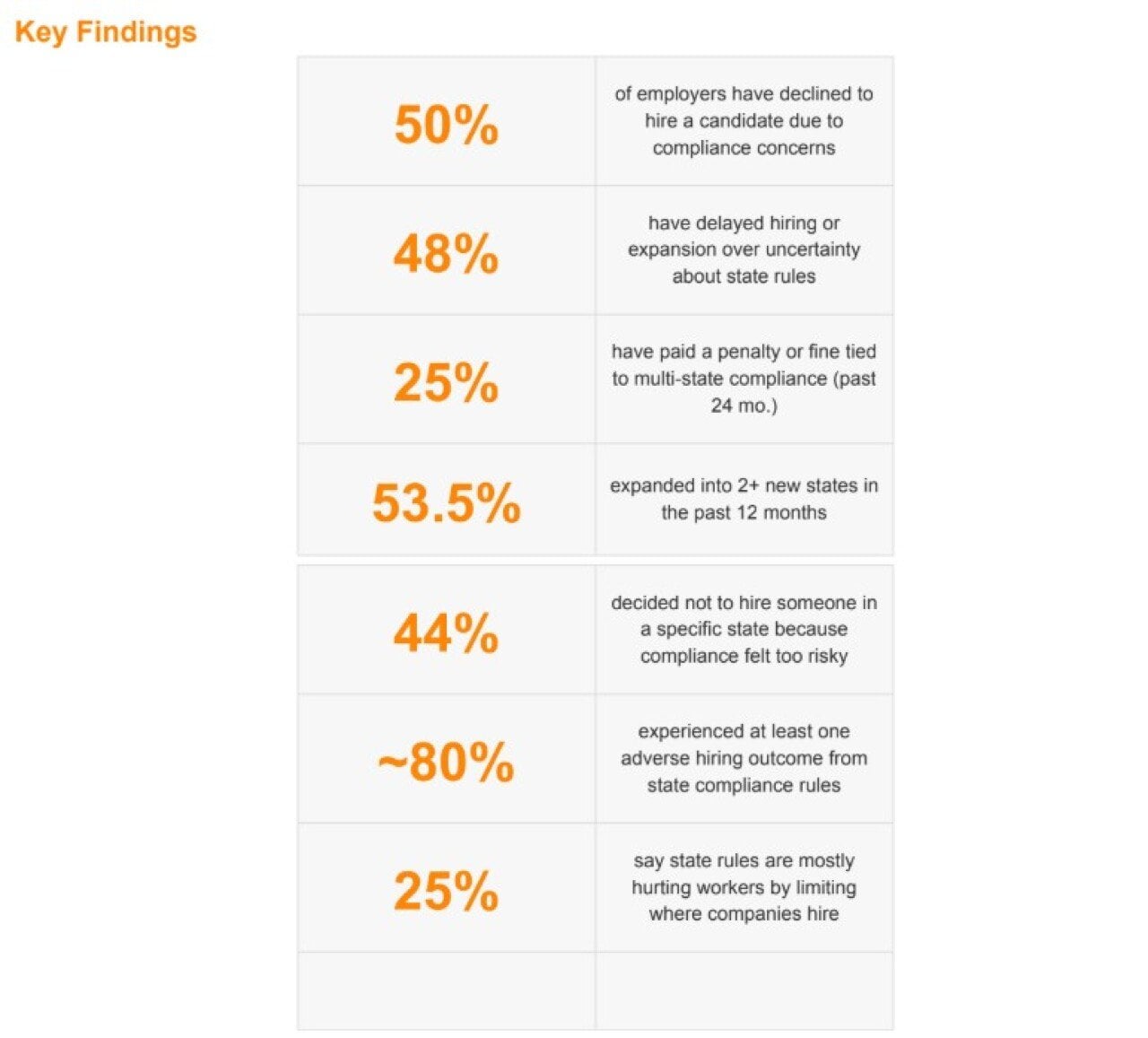
Table listing statistical findings of FoxHire's survey of 1,000 HR professionals to assess operational impact of hiring across multiple U.S. states.

FoxHire

Half of Employers Have Rejected a Candidate Over Compliance

Fifty percent of surveyed employers reported informing qualified candidates that they could not be hired due to state-specific compliance concerns.

These discussions typically occur late in the hiring process, often during final interviews or offer negotiations, after both parties have invested significant time and effort. Despite mutual interest, regulatory requirements in certain states prevent the hire.

Additionally, 43.7% of employers admitted to deciding against hiring candidates in certain states due to perceived compliance risks, without informing the candidates. As a result, candidates are often unaware of the true reason for the lost opportunity.

Together, these findings indicate that compliance-related hiring exclusions are widespread and represent a significant structural challenge within the hiring process.

California and New York Are in a League of Their Own

When asked which states present the greatest compliance challenges, respondents identified California (36.40%) and New York (32.80%) as the most difficult. New Jersey ranked third at 11.40%, significantly lower than the top two states.

Perceptions of compliance difficulty vary by role. HR and people operations professionals rated California as the most challenging state at 41.72%, the highest rating in the survey. This aligns with California’s strict worker classification rules and the Private Attorneys General Act (PAGA), which allows employees to initiate enforcement actions on behalf of the state. For policy and legal teams, California presents significant concerns.

For recruiters, benefits administrators, and payroll teams, New York was identified as the most challenging state. Payroll professionals, in particular, selected New York at 35.44%, compared to 29.11% for California. New York’s compliance requirements include pay transparency laws before offers are made, paid family leave mandates upon hiring, and complex local tax jurisdictions that impact payroll. Additional New York City ordinances further increase compliance obligations.

In summary, California and New York create organizational challenges for different reasons. Consistent concerns across departments highlight a significant operational issue.

80% of Employers Hit at Least One Compliance-Related Hiring Setback Last Year

In the past 12 months, only 20.1% of respondents reported no adverse hiring outcomes related to state-by-state compliance. Consequently, 79.9% experienced at least one negative compliance event.

Negative outcomes included delayed start dates (20.9%), restricting remote hiring to a limited number of states (18.5%), and requiring candidates to relocate for eligibility (17.6%). Additionally, 9.6% of employers reduced pay offers to offset compliance costs.

Financial risks are significant. In the past two years, 25% of employers have paid penalties, interest, or fines related to multi-state compliance. Additionally, 23.8% missed a registration, filing, or reporting deadline, and 24.7% issued back pay or wage corrections. Given these risks, 48% of employers have delayed hiring or expansion due to uncertainty about compliance requirements.

In a competitive labor market, nearly half of companies are delaying hiring, not due to a lack of talent, but because regulatory uncertainty prevents them from proceeding with confidence.

The Patchwork Is Growing, and Workers Are Caught in the Middle

State employment laws serve important policy objectives, such as pay transparency, classification protections, and local wage standards. The challenge arises from the cumulative effect of overlapping regulations.

When asked about the impact of increasing state regulations, only 18.6% of employers said the rules are mostly beneficial to workers. The most common response (32.7%) was that the regulations help and hurt equally. Meanwhile, 25.4% believe the patchwork of rules primarily harms workers by limiting hiring options, and 11.1% feel the regulations favor large companies over smaller ones. Collectively, more than one-third of respondents view the net effect of increased state-level regulation as negative for those it aims to protect.

FoxHire’s analysis of Bureau of Labor Statistics data supports these findings. States identified as most challenging for compliance, such as California, New York, New Jersey, and Illinois, experienced slower employment growth from 2019 to 2024. For example, California’s employment grew by 3.0% and New York’s by 0.8%, compared to 10.3% in Texas and 8.1% in Tennessee.

While regulations serve important purposes, stronger protections in some states often result in fewer employers willing to hire there. This tradeoff warrants careful consideration, as it is reflected in the states where companies choose to operate.

Where This Leaves Employers (and Candidates)

While hiring has become national, compliance infrastructure has not kept pace. Companies expanding into new states and hiring remote talent often require up to a month to ensure compliance with local regulations. During this period, positions remain unfilled and candidates may not receive timely responses.

The national job market is expanding, but compliance processes have not kept up. Companies often avoid certain states due to regulatory complexity and uncertainty. Without improvements in compliance, these challenges will continue to restrict hiring opportunities.

How the Study Was Conducted

The Multi-State Hiring Compliance Burden Index is based on a national survey of HR, payroll, staffing, and business professionals who employ or place workers across multiple U.S. states, conducted via Pollfish. The survey gathered responses from 1,000 professionals and asked them about expansion activity, compliance friction, hiring delays, penalties, and their experiences managing employment law across state lines. FoxHire also paired the survey data with a Bureau of Labor Statistics analysis of nonfarm employment growth from 2019 to 2024 to show how compliance difficulty correlates with actual job growth at the state level.

This story was produced by FoxHire and reviewed and distributed by Stacker.

Topics:

Careers & Education
media-news

Creator Economy News: April 2026 Trends and What They Mean for Your Career

From a $37 billion ad market to AI digital twins, here's what's shaping the creator economy right now.

By Miles Jennings
@milesworks
CEO of Mediabistro, a career community of creative and media professionals
7 min read • Published April 15, 2026
By Miles Jennings
@milesworks
CEO of Mediabistro, a career community of creative and media professionals
7 min read • Published April 15, 2026

The latest creator economy news points in one direction: up. U.S. creator ad spend hit $37.1 billion this year and is projected to climb to $43.9 billion in 2027, according to the IAB. Brand investment that was once speculative is now structural.

For media and marketing professionals, that shift has direct implications for where the jobs are, what skills are in demand, and how careers in this space are being defined. Here’s what’s happening right now.

The Creator Middle Class Is Real

The Influencer Marketing Factory surveyed 1,000 U.S.-based creators in January 2026 and found something the industry has been dancing around for years: a genuine middle class is emerging. Nearly half of creators (48.7%) still earn under $10,000 a year, but 45.6% now earn between $10,000 and $100,000. Only 5.7% clear six figures.

What’s more notable is the trajectory. More than half of surveyed creators (51.5%) reported year-over-year earnings growth in 2025. And 44.9% said they want stability and deeper brand alignment over one-off campaigns — a sign that the gig-work framing of “influencer” is being replaced by something closer to a media career.

The creators who’ve crossed into that $50,000-to-$100,000 tier are increasingly treating their channels the way editors treat a beat: building a defined audience, maintaining a consistent voice, and pursuing long-form brand relationships instead of one-off sponsored posts.

Career note: If you’re a journalist, editor, or content strategist considering a creator pivot, this income data tells a more interesting story than the headline suggests. The path to sustainable creator income looks a lot like the path to building a six-figure freelance practice: niche down, build deep audience relationships, and treat brand deals the way you’d treat a long-term editorial contract.

The report, which also analyzed 5 million creator accounts across Instagram, TikTok, and YouTube in partnership with HypeAuditor, found that the 25-34 age group is now the dominant audience segment across all three platforms. This isn’t the teen creator economy anymore.

Brands Are Shifting to Micro and Macro — and Dropping Celebrities

For 2026, 92% of marketers say they plan to work with both macro influencers (100,000 to 500,000 followers) and micro influencers (5,000 to 100,000 followers), according to Linqia’s State of Influencer Marketing report. Only 29% are still chasing celebrity partnerships.

The logic is straightforward: bigger creators have the reach but not the engagement. The IAB data shows the sharpest growth in creator spend is coming from paid amplification of content beyond social media, projected to jump 56% to $11.1 billion. Brands aren’t just boosting creator posts on TikTok anymore. They’re pulling creator content into display, CTV, and retail media environments.

That expansion is creating a different kind of job. Brands working with hundreds of micro-creators simultaneously need program managers, content strategists, and data analysts who can evaluate creator performance at scale — roles that didn’t exist five years ago but are showing up regularly in social media and influencer marketing job listings today.

AI Is Reshaping Creator Workflows — and Brand Partnerships

Over the past 12 months, 79% of marketers increased ad spend on generative AI creator content, according to Billion Dollar Boy’s research. That same share plans to do it again next year. And 77% say they’ll shift budgets away from traditional creator marketing toward AI-generated content.

That includes digital twins. McKinsey projects the global digital twin technology market will grow about 60% annually through 2027, and the creator economy is one of the sectors driving demand. Billion Dollar Boy found 85% of creators say they’re open to building a digital twin with a brand for marketing purposes. In China, brands are already running creator livestreams that hand off to AI replicas overnight.

For editorial and content professionals, this trend has a practical implication that doesn’t get enough attention: the brands investing in AI content tools still need human strategists to brief them, quality-check outputs, and maintain brand voice. The brand journalism skill set — translating brand objectives into authentic-feeling content — is becoming more valuable as AI handles more of the execution. The strategy layer is still human.

About 62% of creators told The Influencer Marketing Factory they’re worried about increased competition from virtual influencers, and 59% are concerned about feed saturation. Those concerns are reasonable.

They’re concerned about the volume of content, not its quality. The human creators who are building genuine community relationships are largely insulated from AI displacement in the short term.

New Platforms Are Competing for Creator Loyalty

Picsart — the AI-powered design platform with more than 130 million users — launched a creator monetization program this month with no invite list and no minimum audience requirement. Creators build content using Picsart tools, post to their own social channels, and earn revenue based on views, comments, shares, and reach. It’s a performance model, not a follower model, and it signals where monetization is heading: output and results over scale.

Meanwhile, Parade founder Cami Tellez and former TikTok executive Jon Kroopf launched Devotion in March, an influencer marketing platform aimed at helping large brands manage creator programs at scale. Devotion raised $4 million led by Basecase and Will Ventures. The pitch: brands need to work with hundreds or thousands of creators a month to compete algorithmically, and managing that requires infrastructure. Tellez noted that organic reach has dropped from roughly 20% of a creator’s audience to around 2% over the past five years.

That 2% figure is worth sitting with. It means every creator — and every brand publishing organic content — is operating at a fraction of the distribution they had five years ago. It’s one reason why creator-brand partnerships are increasingly treated as paid media placements rather than organic endorsements, and why the influencer marketing manager role has professionalized so quickly.

For anyone considering going full-time as a content creator, this is the environment you’re entering: lower organic reach, higher platform competition, but a more mature monetization infrastructure than has ever existed.

SXSW Put Creators at the Center of Marketing Conversations

At SXSW 2026, the creator economy had its own dedicated programming track, and the through-line across sessions was a shift from audience to community. As Fast Company reported from the conference, brands that treat creators as distribution channels are already losing. The ones building sustained, long-term partnerships with creators who genuinely represent their values are seeing results.

One trend that drew notable attention: creator videos are increasingly appearing in search results for travel, food, beauty, and lifestyle queries. In many cases, a creator video is now the first result a user sees — making creators a direct competitor to traditional publisher content for discovery. For media professionals who’ve spent years building SEO-optimized editorial content, this is the same competitive pressure that social media first applied to print, now moving into search.

What These Trends Mean for Your Career

The creator economy’s growth is producing a real hiring market, but it’s concentrated in specific roles. Brands scaling influencer programs need people who can manage creator relationships, evaluate performance data, and negotiate contracts. Platforms competing for creator loyalty need product and partnerships people who understand the creator perspective from the inside. Agencies need strategists who can translate brand objectives into creator briefs that produce authentic content.

Most of these roles are filled by people who came from adjacent backgrounds: social media management, PR, editorial, talent management. If you’re already working in media or marketing, switching into the creator economy doesn’t mean starting over. It means repositioning skills you already have — audience understanding, content judgment, relationship management — into a space that’s paying more and growing faster than most traditional media roles.

The less-obvious opportunity lies on the creator side of the brand relationship. As influencer programs get more sophisticated, brands want creators who can function more like editorial partners than spokespeople: people who understand narrative, maintain a consistent voice, and can produce content that fits multiple distribution formats.

That’s a description of a journalist or editor (when you squint a bit). If you’ve been looking at creator partnerships as a side income stream, this is a good time to be building that out seriously.

What’s Next

The #paid Creator Signals Report, just released April 14, points to a few lifestyle shifts worth watching. The share of creators focused on financial savings jumped from 32% in 2025 to 76% this year. Travel and vlog content rose from 17% to 58% of what creators are producing. Creators are planning more major life milestones — buying homes, getting married, launching new businesses. And that’s affecting their content and interests.

The read: creators are treating this like a real profession now. And with creator marketing investment headed toward $2 trillion in social commerce globally this year, the brands and platforms that treat creators that way will have a clear advantage.


Mediabistro covers jobs, news, and career resources for creators and media professionals. Browse media industry job listings or explore our career resources.

Topics:

media-news
media-news

T-REX Acquisition Corp. Appoints New Member to its Board of Director

By Media News
2 min read • Published April 15, 2026
By Media News
2 min read • Published April 15, 2026

New to The Street will be filming and discussing this and other developments this week for our network broadcasts

NEW YORK CITY, NY / ACCESS Newswire / April 15, 2026 / T-REX Acquisition Corp. (TRXA:OTCQB), a multi-tiered, vertically integrated crypto-mining business, is pleased to announce the Company’s appointment of David McPhail as Director.

With a career of 38 years, David McPhail has established himself as an expert in the IIoT and manufacturing intelligence sectors. His deep operational background in industrial automation makes him a strategic addition to the leadership landscape.

Frank Horkey, President of T-REX Acquisition Corp., commented on David McPhail’s appointment to the Board: "David’s track record of managing public and private entities, combined with his ability to drive production value, makes him a significant asset to our board. We look forward to his insight and guidance.

About T-REX Acquisition Corp. T-REX Acquisition Corp. is a revenue stage, multi-tiered vertically integrated crypto mining business. Through its wholly owned subsidiaries Raptor Mining LLC (proprietary crypto currency mining), Megalodon Mining and Electric LLC (data centers and co-location services), Sabretooth Mining Containers LLC (fabricators of crypto mining containers for remote deployment) and Deinodon Mining Solutions LLC (proprietary crypto currency mining management software). The Company’s common shares trade on the OTCQB
Venture Market under the symbol "TRXA".

Press Contact: Monica@NewtoTheStreet.com

CAUTIONARY DISCLOSURE ABOUT FORWARD-LOOKING STATEMENTS

This press release contains statements that constitute "forward-looking statements" within the meaning of the U.S. federal securities laws. Such statements include, but are not limited to, the Company’s expectations, beliefs, intentions, plans, forecasts, and projections regarding future performance, business strategy, acquisitions, the development and commercialization of technologies, growth opportunities, market trends, future liquidity, capital requirements, and other events or conditions that may occur in the future. These forward-looking statements are inherently subject to risks, uncertainties, and assumptions. The Company’s actual results, performance, or achievements could differ materially from those expressed in, or implied by, these statements. Among the factors that could cause actual outcomes to differ are, but are not limited to, market conditions, regulatory developments, competition, the ability to integrate acquisitions and realize expected benefits, the effectiveness of investments, financing availability, technological change, macroeconomic factors, and unforeseen events. The Company is
subject to Crypto assets related risks, including sensitivity to the price of Bitcoin and underlying assets, energy consumption, and regulatory related risks. Investors and other readers are cautioned not to place undue reliance on any forward-looking statements, which speak only as of the date they are made. The Company undertakes no obligation, and does not intend, to update or revise any forward-looking statement to reflect new information, future events, or otherwise, except as required by law.

SOURCE: New to The Street

View the original press release on ACCESS Newswire

Topics:

media-news
Productivity

How to Use AI Prompts for Writing (Without Losing Your Voice)

We don't want you to use this AI framework for writing, but you might just do it anyways

writing with ai
Miles icon
By Mediabistro
The Mediabistro editorial team draws on 25 years of media industry expertise to cover jobs, careers, and trends shaping the industry.
17 min read • Originally published April 15, 2026 / Updated April 15, 2026
Miles icon
By Mediabistro
The Mediabistro editorial team draws on 25 years of media industry expertise to cover jobs, careers, and trends shaping the industry.
17 min read • Originally published April 15, 2026 / Updated April 15, 2026

Let’s start with the part most guides skip: this AI prompting process for writing might be a terrible idea for your work.

If you write literary fiction, personal essays, reported journalism, or any creative work where the authentic human voice is the entire point, you should probably stop reading here. Not because this guide will corrupt you, but because for those forms, the struggle to find your voice is the work.

You cannot outsource the struggle, the creative process, the indecision, and the messiness, and keep the art.

And you should also know this – even if you are writing B2B content, for example, using AI too much in your writing can be a huge issue. The AI and ranking systems themselves try their best to spot and reward human perspectives and opinions. So even in what you might call “less creative” fields such as brand content marketing, there are still commercial reasons why using AI prompts is a bad idea.

But, are you still here? Ok. Because there is a real and legitimate use case for what we’re about to discuss, and most guides either ignore the ethics entirely or drown them in so much hand-wringing that the practical value disappears. We’re going to do both: be honest about when this is a bad call, then try to be genuinely useful for the cases when it isn’t.

The Time and Place for AI

Writers wear a lot of hats. The same person who spends Tuesday writing a personal essay they’ve been carrying in their mind for three years also often has to produce:

  • A weekly newsletter that goes out whether they feel inspired or not
  • LinkedIn posts for a client who hired them to maintain a voice, not a byline
  • Substack and newsletters that adhere to a fixed schedule
  • Product copy for a brand they represent
  • Blog content for a media company that runs on volume
  • Email sequences, press releases, pitch templates, and the hundred other things that pay the bills

For that second category, writing that is fundamentally communicative rather than expressive, scaling your voice with AI assistance is a professional tool (and a good one if used correctly), and not a moral failing. The question is whether you’re doing it honestly and whether the output is actually good.

A ghostwriter who has spent years developing a client’s voice and now uses AI to help maintain that voice at scale is not necessarily “cheating,” unless the work itself suffers. A content strategist who trains a model on their own body of work to produce first drafts that they heavily edit is not cheating. A newsletter writer who uses AI to handle the 300 words of context-setting so they can focus on the 200 words of original insight is not cheating.

What is a problem is passing AI output off as deeply personal work, submitting AI-generated essays to literary journals, claiming AI-written journalism and facts as original reporting, or letting the model think for you rather than execute for you. That distinction matters. And really, if you are doing these things, you’re probably only hurting yourself, as “abusing” AI will tend to limit your own professional development.

What Google and AI Search Actually Reward (And Why This Changes the Calculus)

Here is something worth understanding before you go all-in or partially in on AI writing: the content landscape is not moving toward AI-generated text. It’s moving away from it.

Google’s E-E-A-T framework (Experience, Expertise, Authoritativeness, Trustworthiness) is explicitly designed to surface content written by people with real, lived experience in their subject. The “Experience” component added in 2022 specifically targets this: did a human actually do the thing they’re writing about? AI cannot demonstrate experience. It can describe it (often in a recursive manner). That is fundamentally different, and Google’s systems are getting better at telling them apart.

AI-powered search (Perplexity, ChatGPT Search, the AI Overviews in Google itself) pulls from sources that have demonstrated authority over time. Thin AI content farms are actively being deprioritized. The sites winning in AI-summarized results are the ones with genuine depth, original perspective, and the kind of specific, particular voice that signals a human actually wrote this.

That said, it may not exactly be the “human voice” that grants an edge in visibility, but rather providing originality. AI output is necessarily an average, and cites previously created data points. In other words, anything produced by AI has been said before in different ways, and exists on the Internet. It’s your job to create newness – and this is the only thing that will gain long-term visibility and distribution.

What does this mean for writers using AI? It means the human’s job is not being eliminated. The commodity is the AI-generated scaffold. The value is what you bring to it: the original observation, the counterintuitive take, the original data point or statistic, the original reported story, the specific anecdote from your career, the sentence construction that is distinctively yours.

If you train Claude on your voice and then let it write generic content in a pale approximation of that voice, you will likely not be rewarded with distribution. Even if it looks polished and “like your own,” there is still likely no originality.

If you train Claude on your voice, use it to produce structural drafts, and then infuse every output with the specific human observations that only you can supply, you may produce more original work than you could have written alone, faster than you could have written it.

The goal is not to replace your thinking, reporting, and experiential storytelling. It is to stop doing the parts of writing that don’t require your thinking.

What Claude Cowork Actually Is

Claude Cowork is Anthropic’s desktop application that allows you to create persistent, customizable AI workflows tied to your local files and folder system. Unlike the web version of Claude, Cowork can:

  • Access folders on your computer directly
  • Run custom “skills” you define in plain text files
  • Maintain consistent behavior across sessions using those skill definitions
  • Work with your actual documents without copy-pasting

A skill in Cowork is essentially a set of instructions you write once that permanently shapes how Claude behaves when you invoke it. For writers, this is the mechanism that makes everything below possible.

You are going to write a SKILL.md file that tells Claude exactly what your voice sounds like, what your best writing demonstrates, what patterns to use, and what AI-language patterns to purge. Claude will read this file every time you invoke the skill and use it as the foundation for everything it produces.

Note: It is helpful to save a chat as a favorite and link that chat specifically to a particular folder. Think of it this way – you’re not building a general-purpose “memory” in your Claude, you are working on a segmented project, governed by specific folders on your computer. Each project will have its own folder system and purpose.

Step 1: Install Claude Cowork

Download the Claude desktop app from claude.ai/download. Once installed, open it and look for Cowork mode in the settings. Enable it. You’ll be asked to select a working folder on your computer. This is the folder Claude will have access to for reading your writing samples and writing output files.

Create a dedicated folder for this project. Something like:

~/Documents/MyVoice/

Inside that folder, create two subfolders:

~/Documents/MyVoice/samples/
~/Documents/MyVoice/.claude/skills/voice/

The samples/ folder is where your best writing will live. The .claude/skills/voice/ folder is where your skill file will live. (The .claude directory is Cowork’s convention for finding skills.)

Step 2: Build Your Writing Voice Sample Library

This is the most important step and the one most guides rush. The quality of everything Claude produces depends entirely on the quality and volume of what you feed it. Bad samples produce a mediocre imitation of your work. Good samples produce something that actually sounds like you.

What makes a good voice sample for AI

You are not looking for your most popular pieces. You are looking for your most characteristic pieces. The writing that, if someone who knew your work read it anonymously, they would say “that’s definitely you.”

Good samples are:

  • Unedited by a heavy hand: If an editor rewrote significant portions, those edits are not your voice. Use the version closest to what you submitted, not the published version.
  • From your recent output: Your voice changes over time. Writing from five years ago may not represent how you write today. Use the last one to three years if possible.
  • Representative of the type of writing you want to replicate: If you want to scale your newsletter, use newsletter issues as samples. If you want to scale your LinkedIn presence, use LinkedIn posts. The model will absorb the form as much as the style.
  • Long enough to show patterns: A single paragraph tells Claude almost nothing. Aim for complete pieces: full articles, full newsletter issues, full posts. The pattern of how you open, develop an argument, use transitions, and close is as important as your word choices.

How many writing samples do you need?

Aim for 10 to 20 pieces that total at least 10,000 words. More is better up to a point; beyond 50,000 words you’re unlikely to get meaningful improvement, and you’ll be giving Claude more to process in every interaction.

That said, as a separate project,  chat, and folder system, it might be a good idea to download your entire body of work, for example, if you run a blog or newsletter, and use that for surfacing interesting older content. But back to this project…

Save each piece as a plain text or Markdown file in your samples/ folder. Name them clearly:

samples/
  newsletter-jan-2025.md
  newsletter-feb-2025.md
  blog-career-pivot-guide.md
  linkedin-post-collection.md
  feature-story-media-jobs.md

A note on your weakest writing

Do not include pieces you’re embarrassed by. Do not include pieces written under a deadline that don’t represent your best. Do not include pieces where you were writing for an audience that required you to dial back your voice. The model will average what it sees. If you include flat work, you will get even flatter imitations.

Step 3: Write Your SKILL.md File

This is the file that makes everything work and is currently what divides the average prompter from an advanced AI user. You’re going to save this Skill file in a folder, like:

~/Documents/MyVoice/.claude/skills/voice/SKILL.md

Below is a complete example skill template with explanations for each section. Read through and heavily edit the entire thing before using it, because the way you describe your voice to an AI is different from how you’d describe it to a human editor. When it’s done, you’re going to save it in a simple text editor as a file – and then grant your AI access to it.

Note: ensure that the folder paths such as /MyVoice and /Samples are correct in all areas inside this skill.md file and elsewhere.


SKILL.md Template

---
name: voice
description: Write in [YOUR NAME]'s voice. Use this skill any time content
             needs to be written or drafted in their established style.
---
# [YOUR NAME] Voice Skill
## What this skill does
When invoked, this skill produces written content that matches [YOUR NAME]'s
established voice, based on their writing samples. It is not a general-purpose
writing assistant. It writes like them, not like Claude.
## Voice characteristics
[Write 4 to 8 specific, concrete sentences describing your voice.
Avoid vague terms like "conversational" or "engaging" — every writer
thinks they're conversational. Instead, describe the specific mechanics:]
Examples of what to write here:
- I use short paragraphs, rarely more than three sentences. The white space
  is intentional.
- My sentences are direct. I rarely use subordinate clauses when a period
  will do.
- I open with the most interesting thing first. I don't build to a point;
  I start at the point and then support it.
- I use the second person "you" freely. I'm talking to someone, not at them.
- My humor is dry and appears once or twice per piece, usually buried rather
  than announced.
- I reference specific numbers and details rather than generalizing. "Seven
  years" instead of "years." "34%" instead of "most."
- I end pieces on action or implication, not summary. I don't restate
  what I said.
## Reading my samples
Before writing anything, read all files in the samples/ directory of this
project. These are my actual published pieces. They are the primary source
of truth for my voice. If anything in this document conflicts with what
you see in the samples, trust the samples.
Pay special attention to:
- How I open pieces (my first sentence patterns)
- My paragraph length and rhythm
- How I handle transitions (or don't)
- My vocabulary range and the words I reach for
- How I use examples and specificity
- Where and how I use humor
- How I close
## What to produce
When asked to write something, produce:
1. A complete draft in my voice, ready for my review and editing
2. Nothing else — no explanations, no "here's what I did," no meta-commentary
I will edit the draft. Your job is to give me something worth editing.
## Banned language and patterns
Never use any of the following. These are AI-language patterns that will
make the output sound generic and not like me:
### Banned words (never appear in output):
- delve, delving
- navigate, navigating (unless literal navigation)
- landscape (as a metaphor)
- leverage (as a verb)
- utilize (use "use")
- foster
- holistic
- synergy, synergistic
- paradigm, paradigm shift
- robust
- streamline, streamlined
- cutting-edge
- game-changer, game-changing
- deep dive
- unpack (as a verb for ideas)
- unlock
- empower, empowering
- transformative
- innovative, innovation (unless quoting someone)
- seamlessly
- ecosystem (as a metaphor)
- journey (as a metaphor for any non-literal travel)
- framework (unless technical)
- actionable
- impactful
- bandwidth (unless literal)
- boilerplate
- circle back
- at the end of the day
- it goes without saying
- in today's world
- in today's fast-paced world
- the reality is
- the truth is (as a throat-clearing opener)
- make no mistake
- it's worth noting that
- needless to say
- in conclusion
- to summarize
- in summary
### Banned sentence constructions:
- Negative parallelism: "It's not about X, it's about Y" or
  "Not X, but Y" constructions
- Em dashes used for dramatic effect or parenthetical emphasis.
  Use a comma, a period, or parentheses instead.
- Sentences that begin with "It is important to note that"
- Sentences that begin with "It is worth mentioning that"
- Any sentence that opens with "Furthermore," "Moreover," "Additionally,"
  "In conclusion," or similar formal transitions
- Lists introduced with "There are X ways to..." or "Here are X reasons..."
  (use these sparingly and only when I explicitly ask for a list format)
- Filler intensifiers: "truly," "incredibly," "absolutely," "fundamentally,"
  "essentially," "certainly," "undoubtedly," "remarkably"
- Rhetorical questions used as section openers ("Have you ever wondered...?")
- The word "very" before any adjective
### Structural patterns to avoid:
- The "X is important. Here's why." two-sentence opener
- Ending a section with a question to transition to the next section
- The three-example rule (AI defaults to three examples for everything;
  vary this)
- Excessive hedging: "may," "might," "could," "arguably" used more than
  once per paragraph
- Excessive and inauthentic emotionality about mundane subjects
- Summarizing what was just said before moving to the next point
## Quality check
Before outputting anything, re-read the draft and ask:
1. Does this sound like the samples, or does it sound like a capable
   AI writing about the same topic?
2. Are there any banned words or patterns anywhere in the text?
3. Is every claim specific rather than general?
4. Are the paragraphs short enough?
5. Does it open with something interesting, or does it build to something?
6. Would a reader who knows my work recognize this as mine?
If any answer is "no" or "not really," revise before outputting.

Filling in the voice characteristics section

This section is where most writers get stuck, because describing your own voice is unexpectedly hard. Here is a process that helps:

Take your three best writing samples and ask yourself these questions for each one:

  1. What is the average number of words per sentence? (Count ten sentences and divide.)
  2. What is the average number of sentences per paragraph?
  3. What word does the first sentence of each piece do? (Does it state a fact, ask a question, make a claim, begin mid-action?)
  4. How many times do I use the first person “I” per 500 words?
  5. What are five words that appear in multiple pieces that aren’t common filler words?
  6. Is there a recurring structural move I make? (Starting with a story, ending with a call to action, using a concrete example to transition?)

The answers to these questions will be far more useful to Claude than abstract descriptions like “direct” or “approachable.” Claude does not know what your version of “direct” sounds like. But it can learn that you average 14 words per sentence, use “I” four times per 500 words, and always open with a specific fact rather than a generalization.

Step 4: Add Your Anti-AI Language Layer

The banned language list in the template above is a starting point. You need to personalize it with the patterns that specifically don’t sound like you.

Here is how to build your own extended list:

  1. Open Claude (without your skill) and ask it to write a 300-word post about something in your subject area, in a “clear, engaging professional voice.”
  2. Read the output and highlight every word or phrase that sounds slightly off, generic, or like something you would never write.
  3. Do this three times with different topics.
  4. Compile the patterns you found and add them to your banned list.

Common culprits that don’t make the standard lists but show up constantly:

  • Starting sentences with “This means that…”
  • “The key to X is Y” as a sentence structure
  • Phrases like “at its core” or “at its heart”
  • “What this looks like in practice…”
  • “And that’s exactly why…”
  • The phrase “more than ever” (as in “now more than ever”)
  • Compound adjectives that sound like business-speak: “outcome-driven,” “value-added,” “results-oriented”

Also add any words that are simply not yours or you just don’t prefer. If you never use “whilst,” add it. If you never use “myriad” as an adjective, add it. The model does not know your vocabulary; it knows statistical patterns. You need to explicitly fence off the patterns that aren’t yours.

Step 5: Test, Iterate, and Calibrate

Once your skill is set up, run three or four test prompts before using it for real work. Ask it to write pieces similar to what’s in your samples: similar length, similar topic, similar format.

For each test output, do this:

  1. Read it cold, as if you’re a reader encountering your work for the first time.
  2. Circle every sentence that sounds wrong. Not just “AI-ish,” but specifically not like you.
  3. Look for patterns in what you circled. Is it sentence length? Transition choices? Paragraph structure? Something specific to your voice that you didn’t articulate in the skill file?
  4. Go back to the skill file and add that pattern, either as a banned construction or as additional voice guidance.

Plan on three rounds of iteration before the skill is tuned. Most writers find that the first pass captures about 60% of their voice, and each calibration round adds 10 to 15 percentage points. You will never get to 100%, and you shouldn’t try to. The final 20% is what your editing pass is for.

The editing pass is not optional

This cannot be stressed enough. The model produces a draft. You produce the work. The editing pass is where you:

  • Add the specific observation that only you could have made
  • Replace the representative example with the actual thing that happened to you
  • Adjust the rhythm of any paragraph that still feels off
  • Cut anything that the model added for structural completeness that you wouldn’t have included
  • Insert the sentence you thought of while reading that makes the whole piece land

A 500-word Claude draft that you’ve edited for 20 minutes will be better than either a pure Claude draft or a piece you wrote entirely from scratch in 20 minutes. That is the actual value proposition.

Step 6: Running the Skill Day to Day

Once your skill file is in place and your samples folder is populated, here is the workflow:

  1. Open Claude Cowork and grant it access to your MyVoice folder
  2. In your message, invoke the skill by name: “Using the voice skill, write a 600-word newsletter section on [topic].”
  3. If Claude needs specific information, background, or a particular angle, include it in your prompt: “The key insight I want to make is [your actual original thought]. Build around that.”
  4. Review the draft with your editing eye
  5. Edit, add your specific observations, cut what doesn’t work
  6. Then, keep editing until you love it
  7. Publish the version that bears your fingerprints

The more specific you are in your prompts about the idea you want to express, the more useful the output. Vague prompts produce vague drafts. If you know what you want to say, tell the model what you want to say and let it handle the execution. If you don’t know what you want to say yet, that thinking is still your job.

Maintaining the Skill Over Time

Your voice will shift. What you were writing two years ago is probably somewhat different from what you’re writing now. Plan to update your voice samples every six months: add three or four new pieces, remove the oldest ones, and re-run your calibration tests.

Also update the skill file whenever you notice a new pattern that isn’t working: a new AI phrase that has crept in, a structural move the model keeps defaulting to that you don’t use, a characteristic of your newer writing that wasn’t present in your older samples.

The skill file is not a one-time setup. It is a living document that gets more accurate as you learn more about what makes your voice yours.

A Final Word on What This Is and Isn’t

If you train Claude on your ten best pieces and then let it write content you barely read before publishing, you haven’t scaled your voice. You’ve replaced it with a statistical approximation. The output will be “fine.” It will probably even pass a casual reader’s test. But it will be missing the thing that made those ten best pieces worth training on.

The writers who will get real value from this setup are the ones who understand that the model handles the architecture, and they still handle the life inside it. The scaffolding is Claude’s. The building is yours.

One key experience that you’ll notice is that your work output should increase – but it shouldn’t 10X. Writing with AI should still be hard, personal work. You’re striving to increase output of final results while also growing the quality. Most people who follow this process will notice that each piece of writing is still a significant lift. A sign that you’re doing it right might be that you notice a 25% improvement in speed – you don’t really want radical changes.

Where that line of time spent and effort sits is something only you can decide, and it probably sits in a different place for your newsletter than it does for your memoir, for your client work than for your bylined features, for the piece you’re producing on deadline than for the piece you’ve been carrying around for three years.

There is a time and a place. This guide exists to make you effective in the time and place where this is the right call. What that time and place actually is? That’s on you.


Topics:

Productivity
Careers & Education

What is just-in-time learning?

What is just-in-time learning?
By Miguel Rebelo for Zapier
9 min read • Published April 15, 2026
By Miguel Rebelo for Zapier
9 min read • Published April 15, 2026

A vector illustration showing a microlearning approach and related fast education icons.

VectorMine // Shutterstock

What is just-in-time learning?

A customer calls in to ask for a refund. What’s the policy for that, again? You can escalate and hope your supervisor picks up quickly, ping a coworker for a tip, or wing it and hope for the best. And when this question comes up again in the future, you’re back to zero.

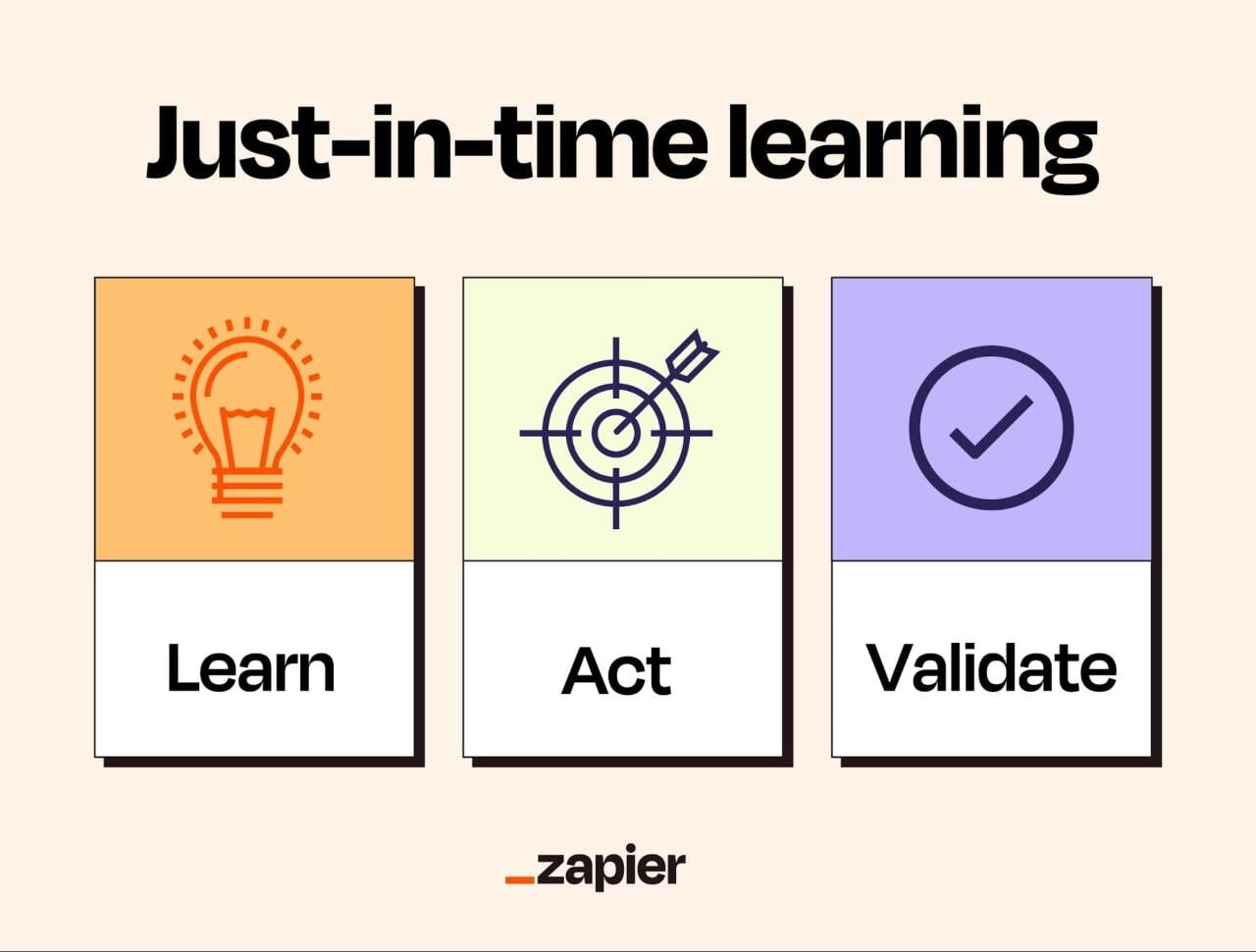
This is where just-in-time learning comes in: Find information in the moment, act on it fast, validate results, and save it for later.

By the end of this guide from Zapier, you’ll know how to get more done without drowning in deep dives.

What is just-in-time learning?

A poster showing the 3 steps of just-in-time learning method.

Zapier

Just-in-time (JIT) learning is a method where you learn the smallest useful thing, right when you need it, in the context where you’ll use it. Instead of taking a long course “just in case,” you find the answers and apply them immediately (“just in time”).

In practice, a developer asks, “How do I write an SQL join?” two minutes before writing the query. A manager looks up “how to run a stay interview” 15 minutes before meeting with an employee who might leave. A sales rep searches “compliance requirements for financial services clients” just before pitching to this kind of client for the first time.

This do-as-you-learn process will push you into Google searches, internal wikis, and plenty of other resources. As you find solutions, you can save and turn them into standard operating procedures (SOPs), templates, and decision trees, making it easier to repeat the correct process in the future.

AI tools can make JIT learning much faster because AI generates responses that are matched to what you’re trying to solve. Of course, it also introduces a bit of risk: The responses can be too long, overwhelming, or not match constraints.

When just-in-time learning works best (and when it doesn’t)

JIT learning is a strong tactical approach, but it won’t work for every task.

  • JIT learning is best for tasks where you can easily tell if the result is wrong or inappropriate. If you vibe code to fix a small HTML issue on your page, reloading your browser will tell you if that worked or not. Any mistakes you make should be low-risk and easy to reverse, too—Ctrl + Z, versioning tools, and working on a copy of a document are your friends. Tasks that have clear steps are also fair game: anything from a step-by-step guide on how to start a project in a tool you rarely use to how to log company expenses correctly.
  • JIT learning is risky if you can’t verify the result quickly. Consider the cost of failure: if personal data is at stake, someone could take legal action, or implementing the change would break trust (either with your customers or your manager). Don’t wing it.

Sometimes a task is mixed. It delivers immediate feedback (good match) but has serious consequences if mishandled (bad idea). Don’t give up on JIT learning just yet: In this case, you can stage your approach by building with dummy data. If it’s working well, you can feed it real data and see how the results compare. If everything is still smooth at this point, use your prototype in a real task and measure the results.

The JIT learning loop

Step 1: Define what ‘done’ means

Having no objective is a recipe for staying in an endless loop. Define what done means, and keep it as small as possible: Adding too many constraints and controlling for too many things will extend the time to complete and overwhelm you.

If your definition of done is “learn PowerPoint,” that’s already too big. “Make a clean five-slide deck with title, agenda, and summary” is just right.

Step 2: Get targeted help

Search for the smallest answer that gets you to “done.” Skip comprehensive guides and courses, and don’t read 10 resources back-to-back. Set a time limit or a maximum number of sites you’ll visit.

Step 3: Apply immediately

This is the moment: Use the help resources you found to act right away. If you’re using live data, work on a copy for safety. Do as much as you can without researching more. If you hit a snag, go back and troubleshoot it with the same mindset. Look for actionable, small steps.

Step 4: Validate

Check your work against the requirements. Test calculations, compare to any source data, and use your critical thinking skills to evaluate if the solution is on target. If you’re close to the end, don’t let perfectionism extend the time to finish: Aim for minimum viable.

Step 5: Document what worked

If your solution works, save your resources, steps, checklists, or decision trees for future reference. Use the feedback you got from managers, coworkers, or customers to make adjustments, and then store the document somewhere your team can access it.

Just-in-time learning example

Your manager sends a Slack message asking for an Excel chart for the next team meeting: “Hey, I need a report on monthly costs versus budget. Could you jump on that quick for the meeting? Flag all the months we went over budget by 10%. Thanks.”

The meeting starts in 20 minutes. Your turn.

Step 1: You turn off all distractions and set a timer for 10 minutes. You define “done” as having an Excel chart and a table of monthly costs compared with the target budget.

Step 2: Open an AI chatbot and ask for the “fastest way to create budget vs actual costs in Excel and highlight months over budget by 10%. Keep the answer short and actionable.”

Step 3: The AI gives you the exact steps. Start by creating a new sheet inside Excel, and copy the live data as needed. Structure the columns, create a pivot table, add a calculate field for the 10% threshold, apply conditional formatting, and to top it off, generate the chart on the table. (You can use Microsoft Copilot to help in this case.)

Step 4: You check if the guidance was on point by checking the results for three months manually. Calculate the variance by hand, confirm the conditional formatting works as it should, and read the results to spot anything weird. You should be out of time by now, so it’s time to save and join the meeting.

Step 5: After the meeting, document every step, adjust based on feedback, and save it as “Budget variance chart – monthly tracking.” The next time your manager drops a line on Slack and wants the same thing, you’ll be ready.

Scaling just-in-time learning to your team

After weeks of just-in-time learning and saving procedures, you’ll have solved dozens of problems and built a solid cache of documented solutions. The next step is to make that knowledge work for everyone.

  • Build your microlearning inventory. List workflows that always raise questions, are too complex, and where people usually get stuck. Pick one per week and document as you work through it.
  • Document while you solve. Capture your process for tricky workflows: all the steps, decision points, resources, mistakes you made, and how you fixed them. Write as if you won’t touch this task again, so you can still solve the issue when you forget and others can execute even if reading for the first time.
  • Make it easy to find. Choose one place to store your documentation—this can be a note-taking platform, an LMS, or an internal tool—and stick to it. As you build your “solution catalog,” decide on a structure/formatting standard to reduce cognitive friction, and use descriptive titles.
  • Keep them fresh. Work evolves, so it’s natural that a checklist that worked today won’t help in six months. Assign who owns each document: Some platforms allow you to do this, but if you’re unlucky, a single sentence with your name and email at the end will work. Revisit each document on a set cadence depending on how many changes you expect over time. You can refresh it monthly or quarterly, for example.
  • Embed it in the flow of work. When you hit an obstacle, you usually have to tab out to search for a solution. What if you didn’t have to and could get instructions as you work? This is especially useful if you’re using internal tools that allow embedding, as you can include help content right inside your CRM, or on a side tab on your customer support agent interface. Start from the documentation, go through the flow, brainstorm tooltips or contextual help, and include a link to the original for easy access.
  • Combine microlearning resources into SOPs. For complex workflows, a single document might not be enough. Pack multiple resources into a single SOP that people can follow from top to bottom.
  • Automate processes. As you create more documentation, notes, and SOPs, you’ll realize that some steps are just busywork: copying/pasting values from one platform to another, sending an email to someone, or searching for data in a specific platform. Start automating these workflows to save even more time.

You know you’re winning if people are asking fewer repetitive questions, when productivity metrics improve, and when your teammates can complete tasks independently without escalating them.

The pitfalls of just-in-time learning

JIT is a practical method for solving problems: Learn what you need when you need it, execute fast, save for later. It sounds easy, but how you consume information and what you believe about your own abilities can get in the way.

The first friction point is information overload, especially if you value being thorough. Nothing kills momentum faster than reading a ChatGPT response with 15 sections and five bullet points each. Our working memory isn’t designed for this kind of digital firehose. This usually manifests as freezing, drops in motivation, brain fog, and difficulty moving forward. Be ruthless: Cut the bloat and focus on the next smallest task.

The second one is having a fixed mindset: believing that traits can’t evolve or change. This shows up when a solution guides you through something you decided you’re not good at—such as writing JavaScript—and you choose not to do it because “you’re not a coder.” Do it anyway, and see how it turns out: The more you surprise yourself, the more you’ll build confidence. That will help you tackle thornier challenges in the future.

But there’s a trap once you get comfortable: It’s possible to mistake good execution for mastery of a topic. An easy way to diagnose this is to put the checklists away: Can you still finish the task with the same level of quality? Real mastery is building foundational knowledge—the why behind the task, the reasoning that separates what’s a good outcome from a bad one. That usually requires experimentation, taking a course, or talking to experts in the field.

The second path is choosing the best kind of media to convey an idea. For most circumstances, text is fine. For others, images may be a better fit. For example, to describe before/after or bad result/good result. Videos are good for software guides and assembling tutorials—or, if a video would be too much, a well-placed GIF can be super effective as well. Think about the objective of the task and what would be the most intuitive way to help someone achieve it.

Start learning just in time

Don’t lose momentum: You’ve got JIT learning fresh in your brain, why not ace a task that’s been hounding you lately?

  • Pick a task you’ve been struggling with, that’s unclear or confusing, or that’s raising a lot of questions with your team.
  • Run the JIT loop.
  • Organize your notes and save them for future reference.

The next time you come across that task, the dread you usually feel will be replaced by confidence.

This story was produced by Zapier and reviewed and distributed by Stacker.

Topics:

Careers & Education
media-news

Cactus Reports Record Revenue Growth

By Media News
4 min read • Published April 15, 2026
By Media News
4 min read • Published April 15, 2026

Leading Creative Agency Announces Several Strategic Promotions, New Hires and Brand Refresh to Support Rapidly Growing Business and Client Portfolio

DENVER, CO / ACCESS Newswire / April 15, 2026 / Cactus, a full-service creative agency that helps brands thrive in harsh environments, reports a significant revenue growth surge of nearly 50 percent over the past two years – putting Cactus in its strongest-ever financial position in its 36-year history. To better serve the needs of its rapidly growing business, Cactus is investing heavily in promoting and acquiring key talent resources while also undertaking a unique and comprehensive brand repositioning.

"Most brands don’t fail because they lack ambition. They fail because the environment gets harder than their original game plan or their current ways of operating can navigate," said Joe Conrad, CEO of Cactus. "Cactus specializes in serving clients who operate in challenging market conditions, like heavily regulated industries and high-pressure competitive landscapes."

"Our agency is a catalyst for brands that are ready to embrace a new approach to thinking differently, being innovative, and making bold moves to not just survive, but thrive in the face of these challenges. This unique methodology has been the main driver of our revenue and client growth, underscoring our need to bolster key talent resources and evolve our brand."

Record Revenue Growth
As noted, Cactus cites as the impetus for its recent revenue boom strong client demand for bespoke solutions designed to resonate with today’s ever-changing consumers. In addition to the nearly 50 percent increase in overall revenues over the past two years, media billings increased from $20M to $85M in under five years, with campaigns spanning many well-known national and regional brands.

Now in its 36th year, Cactus has built its reputation helping brands thrive in harsh environments, or when conditions are stacked against them – both within their individual markets (for example, fierce category competition, stringent regulation, skeptical customers) as well as the overall advertising and marketing terrain (persistent inflation, rising and changing media landscapes).

By combining creative storytelling with measurable business results, Cactus helps clients navigate pressure from virtually any angle and balances creativity and efficacy in a way that few independents can. The agency’s integrated model of brand strategy, creative execution, media planning and buying and analytics gives brands the direction, clarity, and creativity they need to win when the margin for error is slim.

In the past year, Cactus also secured several major client wins, including Ent Credit Union and Wings Credit Union. The agency also saw success with expanding existing client accounts such as Cochlear Americas, Hoosier Lottery, and North Carolina Education Lottery, further strengthening Cactus’ leadership position in supporting the growth of major organizations within the financial services, health, and gaming markets.

Strategic Promotion and Acquisition of Key Talent
Cactus’ team is projected to reach 84 employees in 2026, making it the largest team in the history of the agency. Recent leadership changes include promoting Brian Watson to Chief Creative Officer and Jill Allday to VP, Growth, rounding out Cactus’ exceptionally strong leadership team that also includes Ainslie Fortune, VP, Account Leadership & People; Chris Shewmake, VP, Media & Digital; and Lisa Van Someren, VP, Business Operations.

Additionally, Cactus has announced several new hires, including Ron Villacarillo as Creative Director and Mason Pereira as Senior Strategy Director. These new additions to the Cactus team, in tandem with the promotions of Watson and Allday, showcase the agency’s commitment to supporting its clients and strengthening its team.

Brand Refresh
With the recent revenue growth clearly demonstrating the success of its unique approach, Cactus is reorienting its brand positioning around "helping brands thrive in harsh environments." In doing so, Cactus is returning to its roots, as the "harsh environments" phrase actually dates back to 1990, making this a strategic reawakening rather than reinvention.

In Cactus’ view, this reinvigorated brand embodies a more contemporary, culturally fluent tone that celebrates resilience in the face of client constraints. "Harsh environments" also resonates strongly with clients and prospects seeking an agency comprising true specialists who are experts at operating in complex environments and translating that complexity into clear, actionable strategy and creative.

The updated brand includes a new visual identity, logo, color palette, and typography, as well as a new website which launched today.

About Cactus
Cactus is a full-service creative agency that helps brands thrive in harsh environments. For over 35 years, the agency has partnered with organizations across health and wellness, financial services, outdoor recreation, and gaming to unlock growth in the face of change. Whether navigating disruption, strengthening reputation, or reaching fragmented audiences, we combine sharp strategy, creative, and media expertise to future-proof your brand and help you thrive when it matters most. Agency client partners include Fjällräven, Wings Credit Union, Colorado Lottery, Arapahoe Basin Ski Area, Wings Credit Union, North Carolina Education Lottery, Cochlear Americas, Hoosier Lottery, and Man Therapy.

###

Media Contact:
Kristina LeBlanc
kristina@notablypr.com
508-930-5636

SOURCE: Cactus

View the original press release on ACCESS Newswire

Topics:

media-news

Posts navigation

Older posts
Newer posts
Featured Jobs
Hearst Television
Account Executive
Hearst Television
Array

All Jobs »
PREMIUM MEMBER
AK

Aigerim Khassanova

Long Beach, CA
2025 Years Experience
View Full Profile »
Join Mediabistro Membership Today

Stand out from the crowd with a premium profile

Mediabistro Logo Find your next media job or showcase your creative talent
  • Job Search
  • Hot Jobs
  • Membership
  • Newsletter
  • Career Advice
  • Media News
  • Hiring Tips
  • Creative Tools
  • About
Facebook YouTube Instagram LinkedIn
Copyright © 2026 Mediabistro
  • Terms of Use
  • Terms of Service
  • Privacy